Saturday, January 28, 2023

How to Download Taylor Swift Lavender Haze Music Video

Taylor Swift surprised fans on Thursday by announcing a music video was being released for her song Lavender Haze.


"Lavender Hazewas written by Swift, Jack Antonoff, Jahaan Sweet, Sounwave, Zoƫ Kravitz, and Sam Dew, and produced by the first four in addition to Braxton Cook. According to Swift, the title was a common phrase in the 1950s referring to the state of being in love.

The music video for "Lavender Haze", written and directed by Swift, was released on January 27, 2023. It incorporates psychedelic and surrealist elements visually and features Dominican-American model and trans activist Laith Ashley as Swift's love interest.

In this article, we are mainly to tell you how to download Taylor Swift Lavender Haze Music Video from YouTube

Best YouTube Music Video to MP4 Converter

Macsome YouTube Music Downloader enables YouTube Music Free and Premium users to download music videos from YouTube Music to MP4 with up to 4K resolution. 

Apart from downloading music videos, Macsome YouTube Music Downloader is also able to download YouTube Music tracks, albums, or playlists to your computer at 10x faster speed. Besides, it can also convert YouTube Music to MP3, AAC, WAV, or other common audio formats with high quality. Thus, you can play YouTube Music songs and music videos on any device without YouTube Premium.

Steps to Download YouTube Music Videos to MP4 with High Quality

Macsome YouTube Music Downloader is fully compatible with Windows and Mac computers. Once the installation completes, you can refer to the following tutorial to learn how to download videos from YouTube Music to MP4 step by step.

Step 1. Login to YouTube Music Web Player

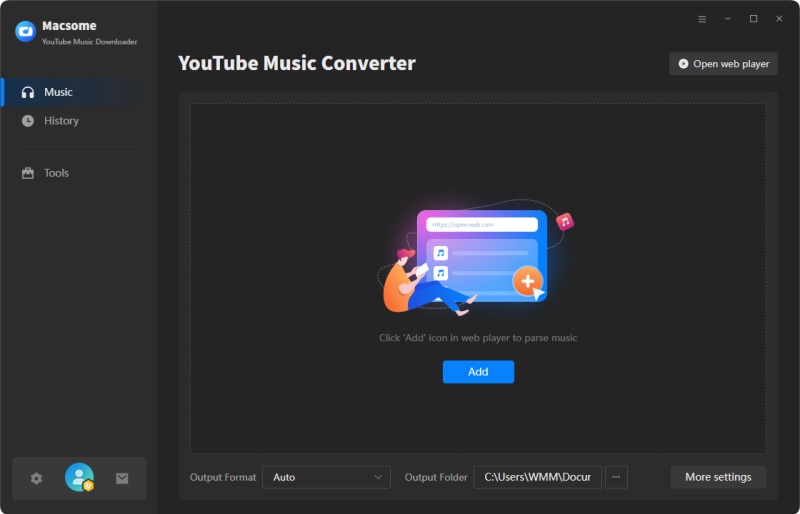
Launch Macsome YouTube Music Downloader on your computer, and tap the "Open YouTube Music Web Player" button. And you will access the built-in YouTube Music web player, then sign in to your YouTube Music account.

The interface of Macsome YouTube Music Downloader

Step 2. Customize Settings Parameters

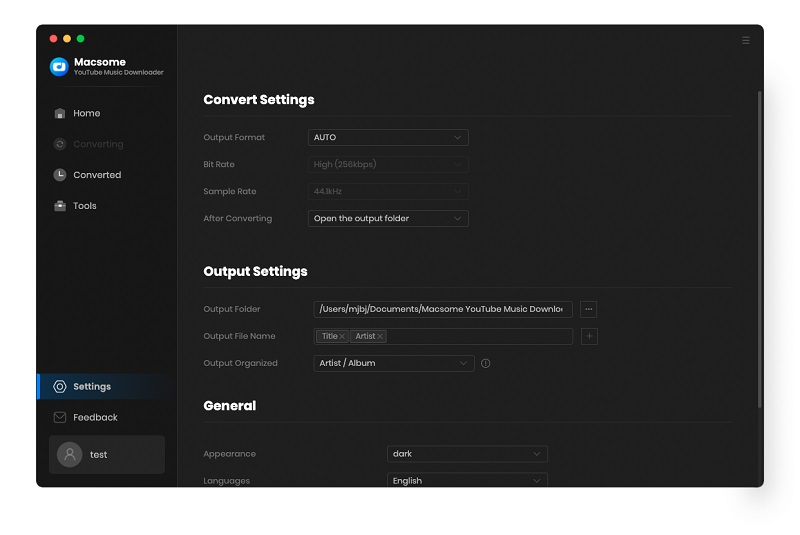
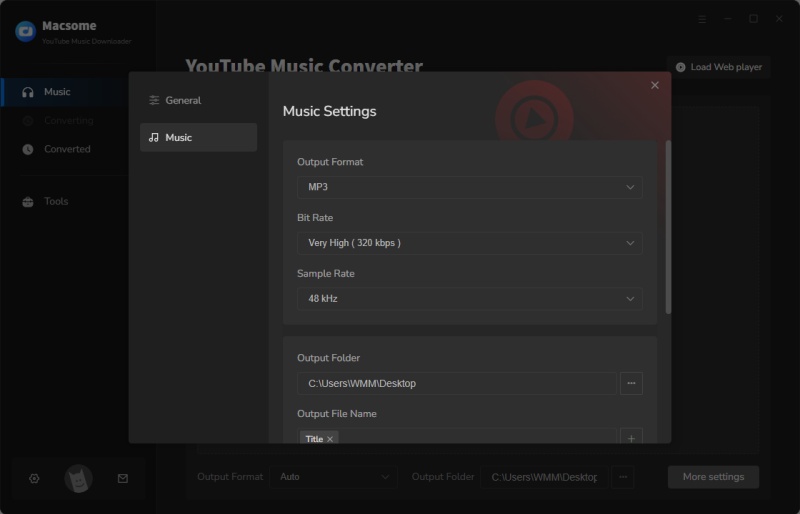
Click on Settings in the top right, and you can customize the output parameters according to what you want. To download YouTube Music videos offline, just toggle on the "Download Video" option. You can also easily change the quality of the video from 480p to 1080p, 2K even 4K.

Set the output format

Step 3. Select Taylor Swift Lavender Haze Music Video to Download

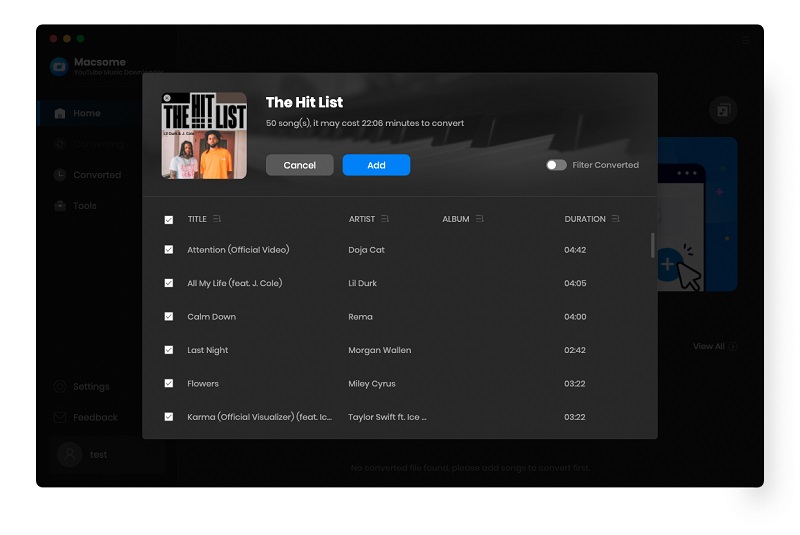
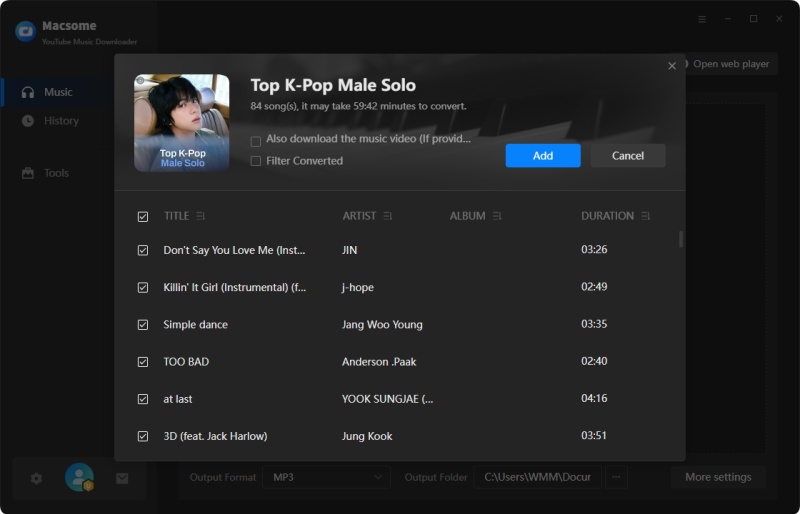
Search Taylor Swift Lavender Haze which includes official music videos, and click on the "Add to list" button, and the song will be loaded. 

Add YouTube Music from other playlists

Step 4. Start to Download Taylor Swift Lavender Haze Music Video to MP4

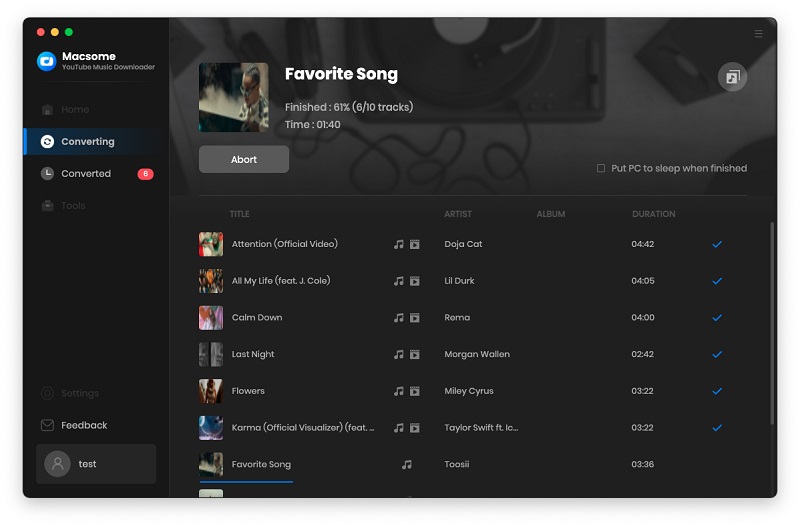
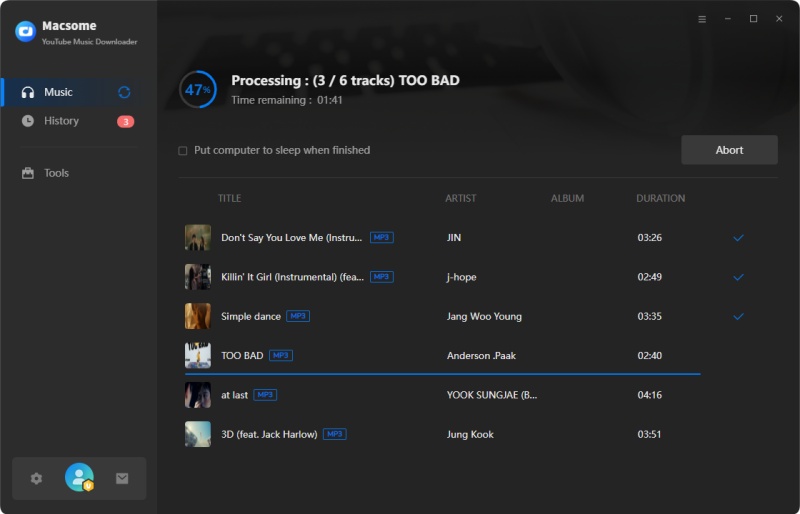
Now you can start downloading music videos from YouTube Music to MP4 by simply tapping the "Convert" button.

Start to Download YouTube Music Videos to MP4

Step 5. Locate YouTube Music MP4 Videos

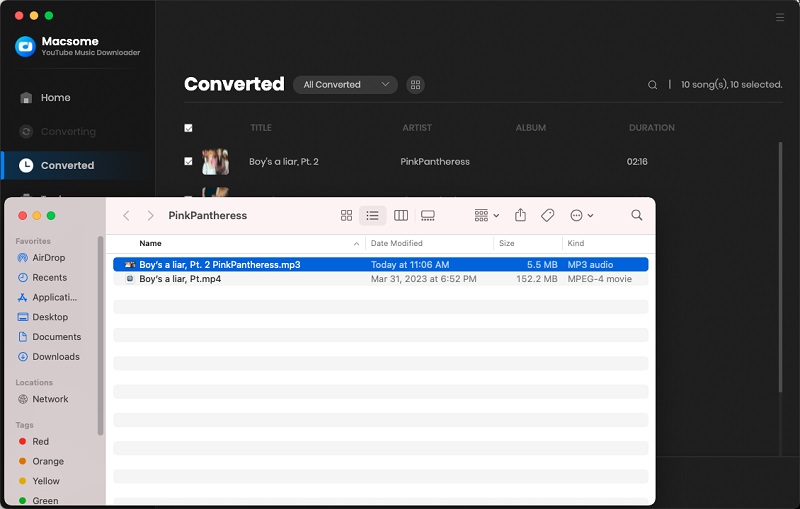
Once finished downloading, click on the history option, and you will find all the downloaded files. Hover over the desired track containing a music video in this list, click it, and you can open the output folder that consists of YouTube Music audio files and videos. Now YouTube Music videos could be downloaded to MP4 files on your computer successfully.

find the downloaded YouTube Music videos to MP4

The detailed guide you can find to download Taylor Swift Lavender Haze .

Wednesday, January 18, 2023

How to Play YouTube Music on iPod

 Can you download YouTube Music to iPod? Due to the popularity of mobile devices, Apple has discontinued the iPod brand, the iPod doesn't integrate YouTube Music, so you can not download and play YouTube Music directly with your iPod.

Don't worry about it. In this post, we will guide you on how to play YouTube Music on iPod. Please follow the steps below and learn how to download and sync YouTube Music to iPod easily and effectively, regardless of the iPod type you have.

You can't transfer YouTube Music to your iPod directly. To get YouTube Music on an iPod, the best method is to try Macsome YouTube Music Downloader. It enables you to convert YouTube Music to MP3, AAC, or other common audio formats with 100% original quality.

It is specially designed for both YouTube Music Free users and Premium subscribers and lets them download songs, playlists, and albums from YouTube Music to iPod supported formats. Then you can move the downloaded YouTube Music songs to iPod and any other devices without any limit.

Before you begin, just click the Download button above to get the latest version of Macsome YouTube Music Downloader.

Step 1. Access the YouTube Music Library

Install and launch Macsome YouTube Music Downloader on your computer, hit on the "Open YouTube Music Web Player" button on the main interface, you will be directed to the login page, and sign in to your YouTube Music account to access the YouTube Music library.

The interface of Macsome YouTube Music Downloader

Step 2. Set MP3 or AAC as the Output Format for iPod

Click on the Settings  icon in the top-right menu bar. From the pop-up window, you can select MP3 or AAC from the Output Format drop-down list.

Besides, you could personalize the audio parameters, like bit rate and sample rate, as you like. If you want to arrange files in a better way, you can customize the output file name and output organized way.

Set the output format for iPod

Step 3. Add YouTube Music Playlists

Navigate to the music library, then select and open a playlist, tap the "Add to list" button to load all the songs of this playlist to the conversion pane. Tick off the tracks you want to download.

Note: Macsome YouTube Music Downloader supports batch conversion, and you can download multiple playlists simultaneously. To do that, you can click on the "Save to list" button, and the selected songs will be added to the task list. Then open another playlist and repeat the same step. After that, you can check all the songs you need from the "Task list" pane.

Add YouTube music from other playlists

Step 4. Start to Download YouTube Music

Press the "Convert" button to start the YouTube Music to iPod supported audio format. Once done, you'll get the YouTube Music tracks with the same ID3 tags as the original files. You can find offline songs by clicking the history folder.

Start to Download YouTube Music to iPod

After downloading YouTube Music songs locally, you can sync YouTube Music songs to your iPod using iTunes by following these simple steps.

Step 1. Open iTunes on your computer, and import the downloaded YouTube Music songs into iTunes library by clicking the top menu File - Add File to Library.

Step 2. Connect your iPod to your computer with a USB cable. Then click the iPod icon in the upper-left corner of the iTunes window to load the info of your iPod model.

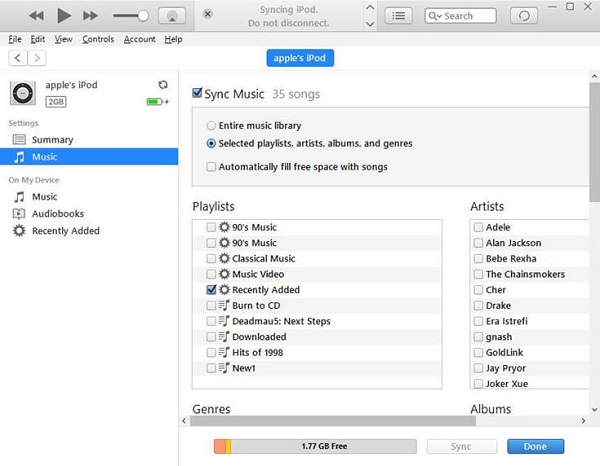
Step 3. From the list under Settings on the left side of the iTunes window, go to Music, select the checkbox next to Sync Music, and choose Selected playlists, artists, albums, and genres.

sync YouTube Music to iPod

Step 4. Under Playlists, check Recently Added where your uploaded YouTube Music songs are saved. Then click the Apply button in the lower-right corner of the window and YouTube Music tracks will be automatically synced to your iPod successfully.

Now you can listen to YouTube Music tracks on iPod Touch, iPod Nano, and any other iPod models at will.

Detailed Tips you can find: http://bit.ly/3kr1NBf

Thursday, December 29, 2022

Macsome Launches Super 2023 New Year Campaign - Up To 42% OFF

 The new year is coming!! Macsome Inc. will launch its biggest 2023 new year sales campaign to celebrate the holidays. And the discount will be disabled on January 12, 2023. Everyone can enjoy the sale promotion and get all Macsome featured products at up 42% off. 


In the past month, Macsome released the biggest sale promotion to celebrate the Christmas and New Year coming for its flagship products. Customers could enjoy all Macsome products yearly and lifetime versions at up to 25% off, including Macsome Spotify Downloader, iTunes Music Converter, Amazon Music Downloader, Tidal Music Downloader, Deezer Music Converter, YouTube Music Downloader, Audiobook Converter, and Pandora Music Downloader.

Now the promotion is still valid.  Macsome 2023 New Year sale promotion will be ended on January 12, 2023. For more information on the promotion, please visit the promotion page: https://www.macsome.com/promotion/2022-christmas-sales.html 

Macsome Spotify Music Downloader (1-Year & Lifetime PLANS)

1 Yearly Plan Was: $59.95  New Year Sale’s Price: $44.96

Lifetime Plan Was: $129.90  New Year Sale’s Price: $97.50

Macsome Spotify Downloader is specially designed for both Spotify Premium and Free users to batch download Spotify tracks, playlists, albums, radios, and podcasts with high quality. It can also convert Spotify music to lossless MP3, AAC, WAV, AIFF, FLAC, and ALAC formats at 10X speed, and with ID3 tags. With this tool, anyone can download music from Spotify to their local computer for playback offline by using this tool.

Macsome iTunes Converter (1-Year & Lifetime PLANS)

1 Yearly Plan Was: $59.95  New Year Sale’s Price: $44.96

Lifetime Plan Was: $129.90  New Year Sale’s Price: $97.50

Macsome iTunes Converter is specially developed to download Apple Music songs, iTunes purchased tracks, and audiobooks with original quality. It can also support converting Apple Music to MP3, FLAC, AAC, AIFF, WAV, or ALAC format at 10X speed. Plus, it is capable of downloading Apple Music tracks without damaging the original streaming audio quality

Macsome Amazon Music Downloader (1-Year & Lifetime PLANS)

1 Yearly Plan Was: $59.95  New Year Sale’s Price: $44.96

Lifetime Plan Was: $129.90  New Year Sale’s Price: $97.50

With Macsome Amazon Music Downloader, you can download songs, playlists, albums, and podcasts from Amazon Music Unlimited & Prime Music with HD/Ultra HD quality. It allows you to download any Amazon Music songs to MP3, AAC, FLAC, WAV, AIFF, and ALAC with ID3 tags kept.

Macsome Tidal Music Downloader (1-Year & Lifetime PLANS)

1 Yearly Plan Was: $59.95  New Year Sale’s Price: $44.96

Lifetime Plan Was: $129.90  New Year Sale’s Price: $97.50

Macsome Tidal Music Downloader is dedicated to downloading Tidal music, albums, and playlists to plain MP3, AAC, FLAC, WAV, AIFF, and ALAC formats with up to HiFi sound quality output preserved. It is available for Tidal Free, Tidal HiFi, and Tidal HiFi Plus users.

Macsome Deezer Music Converter  (1-Year & Lifetime PLANS)

1 Yearly Plan Was: $59.95  New Year Sale’s Price: $44.96

Lifetime Plan Was: $129.90  New Year Sale’s Price: $97.50

Macsome Deezer Music Converter works perfectly in converting and downloading songs, playlists, albums, or podcasts from Deezer to lossless audio formats, including MP3, AAC, WAV, FLAC, AIFF, and ALAC. Additionally, there is no need to install an extra Deezer Music app. You can easily download music from Deezer in batches with the embedded Deezer Web Player.

Macsome YouTube Music Downloader  (1-Year & Lifetime PLANS)

1 Yearly Plan Was: $59.95  New Year Sale’s Price: $44.96

Lifetime Plan Was: $129.90  New Year Sale’s Price: $97.50

With Macsome YouTube Music Downloader, you can download YouTube Music songs, playlists, and albums with original quality. It can also convert YouTube Music songs to

MP3, AAC, WAV, FLAC, AIFF, and ALAC for free. Both YouTube Music Premium and YouTube Music Free users can download YouTube Music songs to the local folder for offline listening.

Macsome Pandora Music Downloader  (1-Year & Lifetime PLANS)

1 Yearly Plan Was: $59.95  New Year Sale’s Price: $44.96

Lifetime Plan Was: $129.90  New Year Sale’s Price: $97.50

Macsome Pandora Music Downloader is able to download Pandora songs, playlists, albums, and podcasts to your computer. It can support converting Pandora songs to MP3, AAC, WAV, FLAC, AIFF, and ALAC for free. It applies to both Pandora Premium and Pandora Free users. After canceling your Pandora Premium subscription, you can still listen to Pandora songs offline.

Macsome Audiobook Converter (1-Year & Lifetime PLANS)

1 Yearly Plan Was: $59.95  New Year Sale’s Price: $44.96

Lifetime Plan Was: $129.90  New Year Sale’s Price: $97.50

Macsome Audiobook Converter enables users to download Audible AA/AAX audiobooks with keeping lossless streaming music quality. It also performs almost 60X faster in converting audiobooks to MP3, M4A, and M4B. It supports downloading audiobooks from Audible Plus catalog easily. 

Price and Availability: 

Macsome provides 42% discounts for all its single products. Customers can enjoy the sales to get different plans for these programs on Windows and macOS, including yearly plans and lifetime plans. All the tools will help users enjoy all audio streaming files easier. Don't miss this new year promotion!!!

https://www.macsome.com/promotion/2022-christmas-sales.html

Hope the year 2023 will be a perfect year and wish you a happy new year to all of you.

 About Macsome Inc

Macsome Inc is a software development company which established in 2008. It is devoted to providing ultimate multimedia solutions to customers worldwide. Main products include Spotify Downloader, Apple Music Converter, Amazon Music Downloader, Tidal Music Downloader, Deezer Music Converter, Audiobook Converter, YouTube Music Downloader, and Pandora Music Downloader.

Press Contact

Email: market@macsome.com

Website: https://www.macsome.com

Promotion page: https://www.macsome.com/promotion/2022-christmas-sales.html

Sunday, December 25, 2022

How to Download Music from Deezer Web Player

 The offline mode option is only available with the Deezer mobile or desktop app. You can't download tracks on the Deezer web player. This article will provide a feasible workaround to download music from the Deezer web player

With Macsome Deezer Music Converter, you don't have to install the Deezer app on your computer. It can download Deezer tracks, albums, playlists plus podcasts from a built-in Deezer player. As an extraordinarily powerful Deezer Music Converter, it can convert Deezer music to MP3, AAC, FLAC, WAV, and other standard audio formats with lossless audio quality and ID3 tags.

In this part, we will show you how to download Deezer songs from the Deezer web player with the help of a Macsome Deezer Music Converter. It is compatible with Windows and Mac. Here we will use the Windows version. Before starting, please make sure you have installed the latest version of the Macsome Deezer Music Converter on your computer.

Step 1. Login Deezer Music Web Player

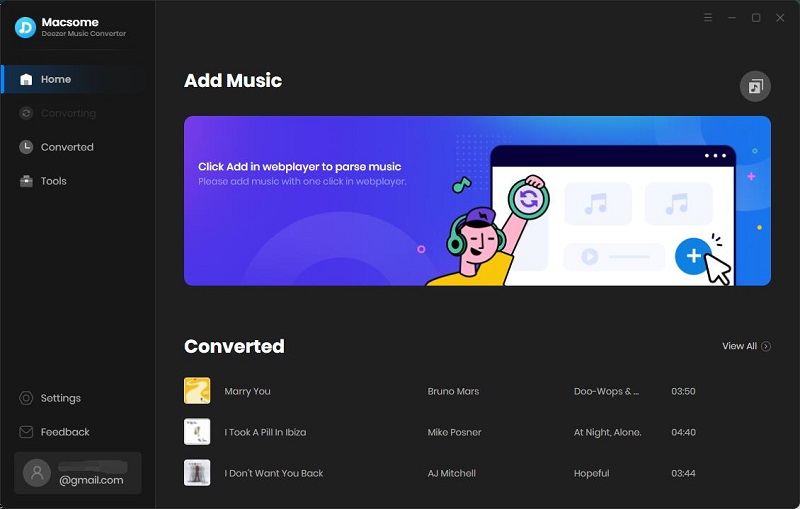
Launch the program, and you have easy access to the Deezer web player by clicking the "Open Deezer Web Player" button on the main interface. Click on "LOG IN" in the top right-hand corner, then you are directed to the login screen. Log in with your Deezer details.

The interface of Macsome Deezer Music Converter

Step 2. Customize the Output Parameters

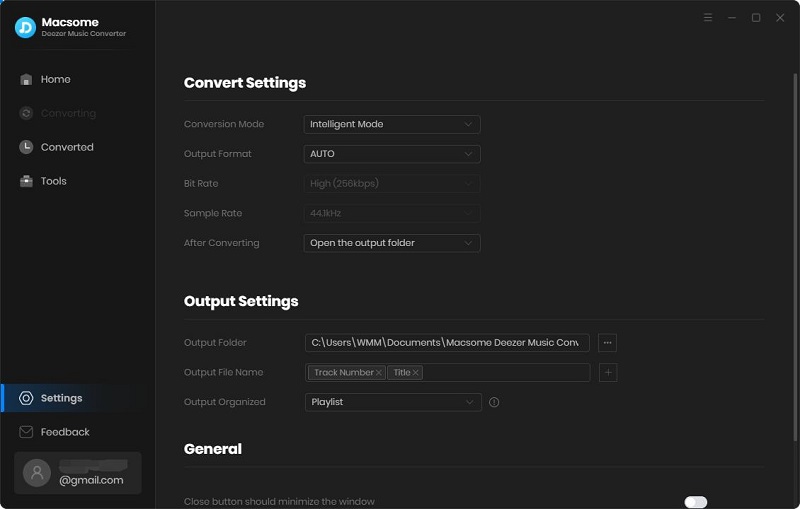
Click on the  Settings icon in the top right corner of the interface, and the Settings window will pop up. The output format is set as AUTO by default. Macsome supports multiple output formats, including MP3, AAC, WAV, FLAC, AIFF, and ALAC.

Moreover, you can customize the parameters such as bit rate and sample rate to keep the high quality of Deezer Music songs. You can also change the output directory as you need. The changes will take effect when you close the Settings window.

Set MP3 as the output format

Step 3. Import Songs or Playlists from Deezer Web Player to Macsome

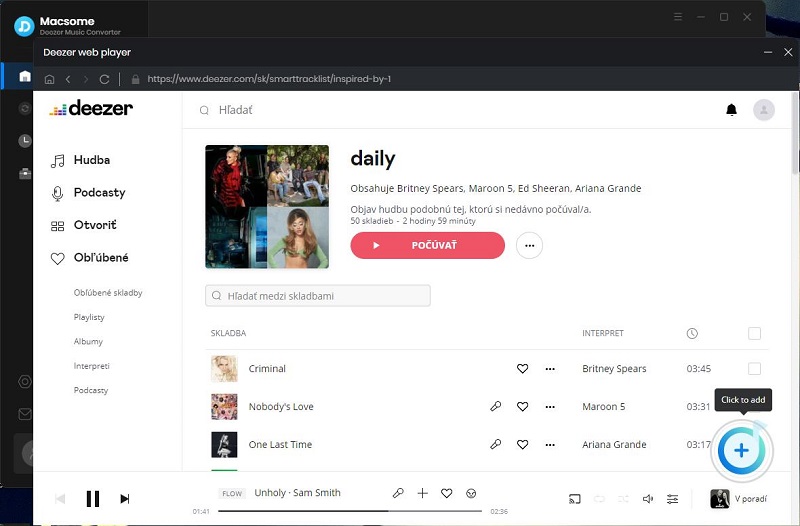
Head to the Deezer library, and open the playlists you want to download. Click the "Add to list" button, and all the songs will be loaded.

Hit on the "Save to list" button, and the selected songs will be added to the task list. Then you can select other playlists and add them in the same way. After all the songs you want are added to the task list, click the "task list" icon button in the upper right to check.

Add Deezer Playlits to Macsome

Step 4. Start to Download Deezer Music to MP3

Once all the settings are set well, click the "Convert" button to start downloading process. Macsome supports downloading Deezer songs at up to 10x faster speed with original ID3 tags and quality preserved.

download Deezer music

After the downloading is finished, you will find the downloaded Deezer songs saved in the local folder by clicking the history icon. Here is all about how to download music from the Deezer web player

find the downloaded Deezer music


Tuesday, December 20, 2022

Macsome Inc. Launched Christmas Sales – Save Up to 42% Off

 Macsome 2022 Christmas and New Year sales are live now, everyone can save up to 42% on Macsome featured programs, including Spotify Downloader, iTunes Converter, Amazon Music Converter, Tidal Music Downloader, Deezer Music Converter, YouTube Music Downloader, Pandora Music Downloader, and Audiobook Converter.  


Macsome Inc., a professional software developing company, has started its big sale this Christmas season. Everyone is able to enjoy up to 42% discount on all its popular multimedia software and exclusive bundles. 

The 2022  Macsome Christmas & New Year Sale is now live and will last until Jan. 12, 2023. You can grab the last chance this year to get the programs you like at a favorable price!

 Users can save up to 25% off on the yearly license and lifetime version. And users can also enjoy up to 42% off on exclusive bundles of video streaming programs. 

More Details of Macsome 2022 Christmas Big Sale at https://www.macsome.com/promotion/2022-christmas-sales.html 

Now let's see more details about Macsome 2022 Christmas special deals

Macsome Spotify Music Downloader (1-Year & Lifetime PLANS)

1 Yearly Plan Was: $59.95  Christmas Sale’s Price: $44.96

Lifetime Plan Was: $129.90  Christmas Sale’s Price: $97.50

Macsome Spotify Downloader is specially designed for both Spotify Premium and Free users to batch download Spotify tracks, playlists, albums, radios, and podcasts with high quality. It can also convert Spotify music to lossless MP3, AAC, WAV, AIFF, FLAC, and ALAC formats at 10X speed, and with ID3 tags. With this tool, anyone can download music from Spotify to their local computer for playback offline by using this tool. 


Macsome iTunes Converter (1-Year & Lifetime PLANS)

1 Yearly Plan Was: $59.95  Christmas Sale’s Price: $44.96

Lifetime Plan Was: $129.90  Christmas Sale’s Price: $97.50

Macsome iTunes Converter is specially developed to download Apple Music songs, iTunes-purchased tracks, and audiobooks with original quality. It can also support converting Apple Music to MP3, FLAC, AAC, AIFF, WAV, or ALAC format at 10X speed. Plus, it is capable of downloading Apple Music tracks without damaging the original streaming audio quality. 


Macsome Amazon Music Downloader (1-Year & Lifetime PLANS)

1 Yearly Plan Was: $59.95  Christmas Sale’s Price: $44.96

Lifetime Plan Was: $129.90  Christmas Sale’s Price: $97.50

With Macsome Amazon Music Downloader, you can download songs, playlists, albums, and podcasts from Amazon Music Unlimited & Prime Music with HD/Ultra HD quality. It allows you to download any Amazon Music songs to MP3, AAC, FLAC, WAV, AIFF, and ALAC with ID3 tags kept. 


Macsome Tidal Music Downloader (1-Year & Lifetime PLANS)

1 Yearly Plan Was: $59.95  Christmas Sale’s Price: $44.96

Lifetime Plan Was: $129.90  Christmas Sale’s Price: $97.50

Macsome Tidal Music Downloader is dedicated to downloading Tidal music, albums, and playlists to plain MP3, AAC, FLAC, WAV, AIFF, and ALAC formats with up to HiFi sound quality output preserved. It is available for Tidal Free, Tidal HiFi, and Tidal HiFi Plus users. 


Macsome Deezer Music Converter  (1-Year & Lifetime PLANS)

1 Yearly Plan Was: $59.95  Christmas Sale’s Price: $44.96

Lifetime Plan Was: $129.90  Christmas Sale’s Price: $97.50

Macsome Deezer Music Converter works perfectly in converting and downloading songs, playlists, albums, or podcasts from Deezer to lossless audio formats, including MP3, AAC, WAV, FLAC, AIFF, and ALAC. Additionally, there is no need to install an extra Deezer Music app. You can easily download music from Deezer in batches with the embedded Deezer Web Player.


Macsome YouTube Music Downloader  (1-Year & Lifetime PLANS)

1 Yearly Plan Was: $59.95  Christmas Sale’s Price: $44.96

Lifetime Plan Was: $129.90  Christmas Sale’s Price: $97.50

With Macsome YouTube Music Downloader, you can download YouTube Music songs, playlists, and albums with original quality. It can also convert YouTube Music songs to

MP3, AAC, WAV, FLAC, AIFF, and ALAC for free. Both YouTube Music Premium and YouTube Music Free users can download YouTube Music songs to the local folder for offline listening.


Macsome Pandora Music Downloader  (1-Year & Lifetime PLANS)

1 Yearly Plan Was: $59.95  Christmas Sale’s Price: $44.96

Lifetime Plan Was: $129.90  Christmas Sale’s Price: $97.50

Macsome Pandora Music Downloader is able to download Pandora songs, playlists, albums, and podcasts to your computer. It can support converting Pandora songs to MP3, AAC, WAV, FLAC, AIFF, and ALAC for free. It applies to both Pandora Premium and Pandora Free users. After canceling the Pandora Premium subscription, you can still listen to Pandora songs offline.


Macsome Audiobook Converter (1-Year & Lifetime PLANS)

1 Yearly Plan Was: $59.95  Christmas Sale’s Price: $44.96

Lifetime Plan Was: $129.90  Christmas Sale’s Price: $97.50

Macsome Audiobook Converter enables users to download Audible AA/AAX audiobooks with keeping lossless streaming music quality. It also performs almost 60X faster in converting audiobooks to MP3, M4A, and M4B. It supports downloading audiobooks from the Audible Plus catalog easily. 

Note: Macsome Inc. is providing its biggest 2022 Christmas & New Year sales

 - 42% off on all its yearly plans as well as life plans to get the full features from the official website page. Macsome 2022 Christmas & New Year Sales are valid from Dec. 13, 2022, to Jan. 12, 2023. Don't miss this rare opportunity and take action now while there is still time! 

Learn more at: https://www.macsome.com/promotion/2022-christmas-sales.html

 About Macsome Inc

Macsome Inc is a software development company which established in 2008. It is devoted to providing ultimate multimedia solutions to customers worldwide. Main products include Spotify Downloader, Amazon Music Downloader, Tidal Music Downloader, Audiobook Converter, Apple Music Converter, and the newly launched Deezer Music Converter. 

Press Contact

Email: market@macsome.com

Website: https://www.macsome.com

Promotion page: https://www.macsome.com/promotion/2022-christmas-sales.html
How to Download Amazon Prime Music Tracks for Playback On-demand

Amazon Music has expanded its music benefit for Prime members to bring them 100 million songs in shuffle mode, the most ad-free top podcasts available, and features that make it easier to discover new content in the Amazon Music app—all at no additional cost to their membership.


The following is a list of updates, available now at no additional cost to a Prime membership.

  • Access to a full catalog of 100 million songs in shuffle mode
  • An ad-free listening experience for podcast lovers
  • New Amazon Exclusive podcasts across genres were released
  • Features that make it easier to discover your next favorite podcast
Amazon Prime users can only stream a collection of All-Access playlists tailored to personalized listening preferences on demand and available to download for offline listening. Users can't select the songs to download.

Monday, November 28, 2022

How to Download Deezer Podcasts to Listen Offline

If you are looking for a way to download Deezer podcasts on your computer, you have come to the right place. In this article, we will introduce the two different approaches for Deezer subscribers to download podcasts from Deezer to listen to Deezer podcasts offline.

 Macsome Deezer Music Converter is a reliable Deezer Podcasts Downloader. With it, you can download Deezer music tracks, playlists, albums, and podcasts as local files so that you can play them on as many devices without any restrictions.

Step-by-step Guide to Download Deezer Podcasts on Computer

In the tutorial that follows, we are going to show you how to download podcasts from Deezer with Macsome Deezer Music Converter. If you are interested in this program, please read the steps below to see how it works.

Step 1. Login Deezer Music Web Player

First, please make sure you have installed Macsome Deezer Music Converter on your computer. Once done, launch it by double-clicking on it. Once it is completely opened, you will see the "Open Deezer Web Player" button on the main interface. The button is for the anchor that goes to the login page. Please use your account to log in to Deezer Web Player.

Interface of macsome deezer music converter

Step 2. Customize the Output Parameters

Click on the Settings icon in the upper right-hand corner of the interface, if you choose "AUTO" from the output format list, the songs will be saved with the best audio quality. You can also set MP3, AAC, WAV, FLAC, AIFF, and ALAC as the output format. 

Besides, you can also change the output folder you preferred to save the downloaded Deezer podcasts.

Set output format

Step 3. Browse and Select Podcasts You'd Like to Download

You can find a podcast using the Search box or you can browse podcasts in the Podcasts tab list on the left side. Select an episode you want to download and click the blue "Add to list" button to add the selected podcast to the conversion panel.

Add Deezer music

Step 4. Start to Download Deezer Music Podcasts

Click the "Convert" button, and Macsome will start downloading the Deezer podcasts you want.

start to download deezer music

When the downloading is finished, your favorite podcasts would be downloaded to local files on your computer successfully. To find them on your computer, you can click the history icon beside the settings. Hit the "folder" icon, and you will see the Deezer podcasts stored locally. And you are free to play Deezer podcasts offline whenever and wherever possible.

find the downloaded Deezer music