Showing posts with label Spotify Downloader. Show all posts

Friday, January 24, 2025

How to Download Spotify Most Streamed Songs Of All Time Without Premium

What are Spotify most streamed songs of all time? Here is the full playlist of "TOP 100 Most Streamed Songs Of All Time."

This ranking is very straightforward, providing you with the list of most streamed tracks on Spotify. 

This post will show you how to download Spotify most streamed songs by using Macsome Spotify Downloader, even without a Premium subscription. 

How to Download Spotify Most Streamed Songs Of All Time Without Premium 

Macsome Spotify Downloader is a software tool designed to help users download and convert Spotify music and playlists into various formats for offline listening. It allows you to enjoy your favorite Spotify tracks, albums, and playlists without the need for a Spotify Premium subscription.

Key Features

Download and Convert: Allows downloading of Spotify music and conversion into formats like MP3, AAC, WAV, AIFF, ALAC, and FLAC.

High-Quality Audio: Maintains the original audio quality during the conversion process.

Batch Downloading: Supports downloading multiple tracks or entire playlists at once.

Preserve ID3 Tags: Keeps metadata such as artist, album, and track information intact.

Steps to Download Spotify Most Streamed Songs with Macsome

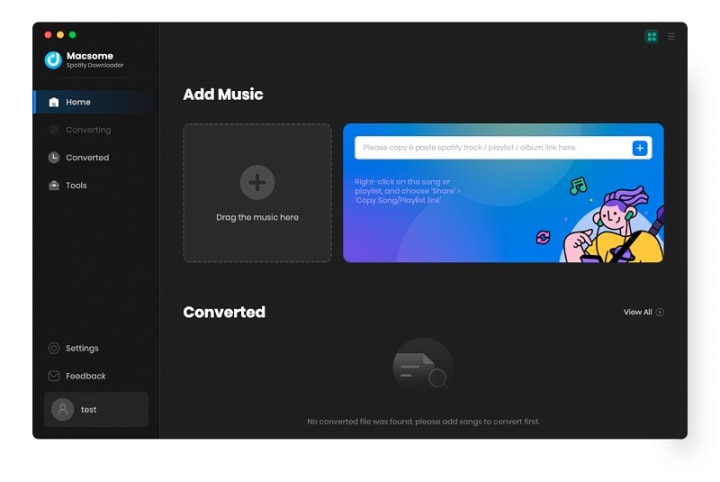
Step 1. Add Spotify Music to Macsome Spotify Downloader.

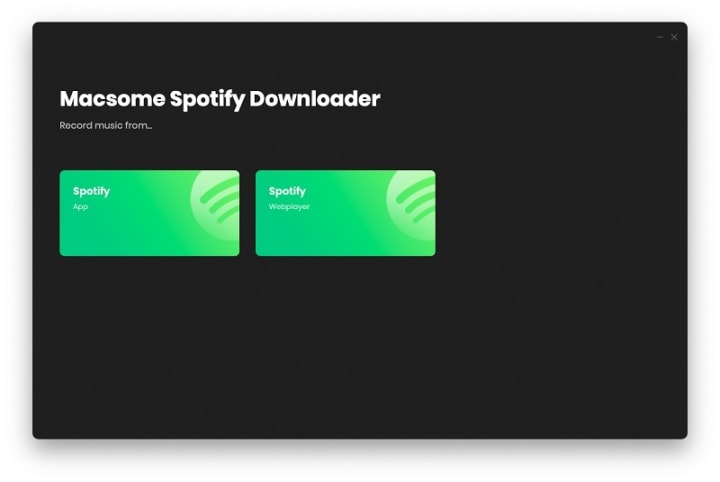
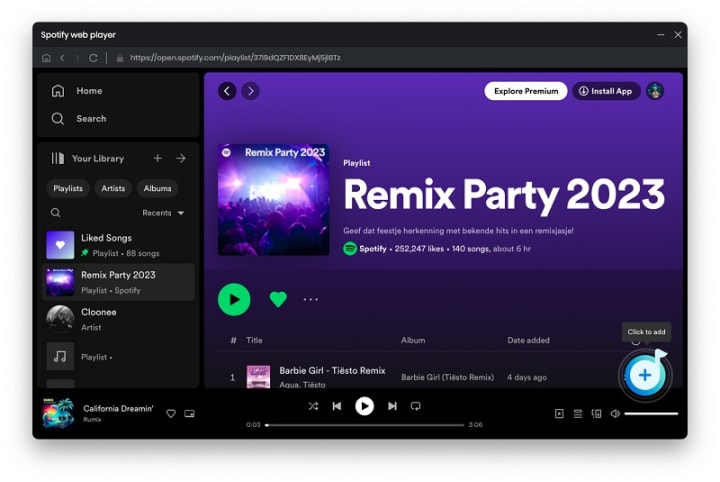
Open Macsome Spotify Downloader. It supports two download modes, here we'll select the Spotify app mode, and the Spotify app will launch at the same time. Just copy the URL to the Most Streamed Songs on Spotify to the Macsome. 

Step 2. Set Output Format.

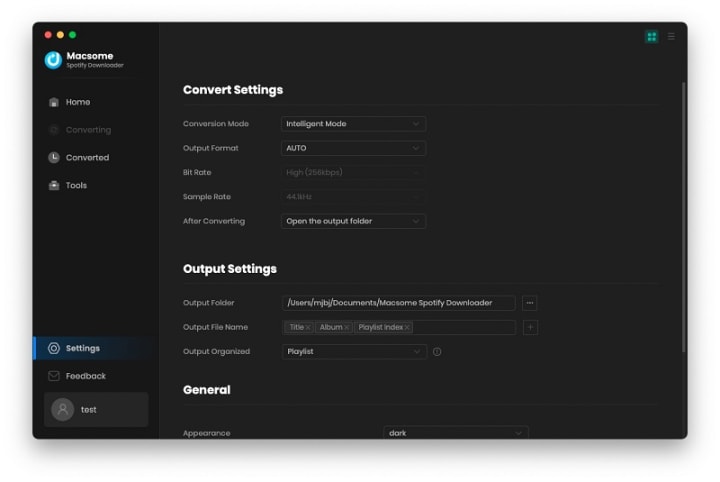
Go to the "Settings" tab, you can set the MP3 as the output format. You can also change the output quality, output path, output file name, and more. If you want to download lyrics, please check the "Save lyrics (if provided)" option.

Step 3. Download Spotify Music.

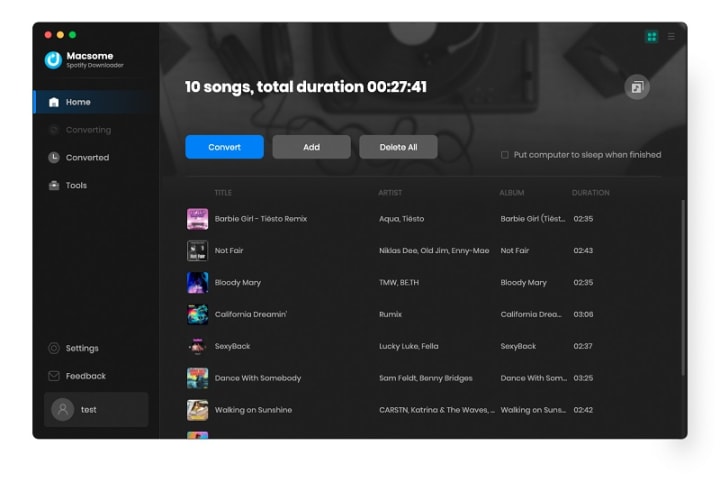
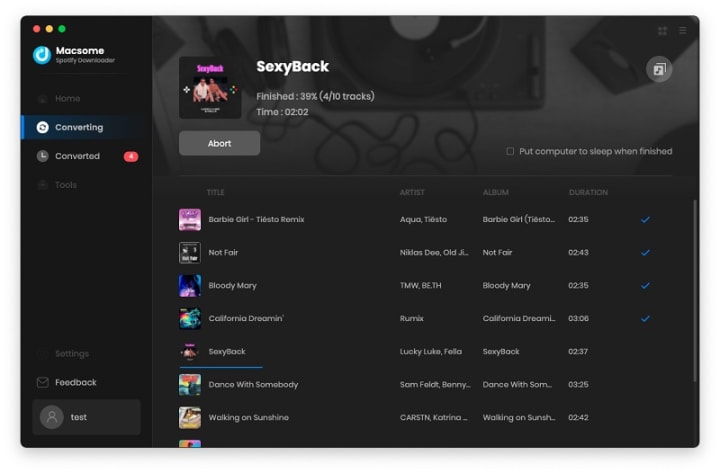
Click the "Convert" button to start downloading Spotify music to MP3 format.

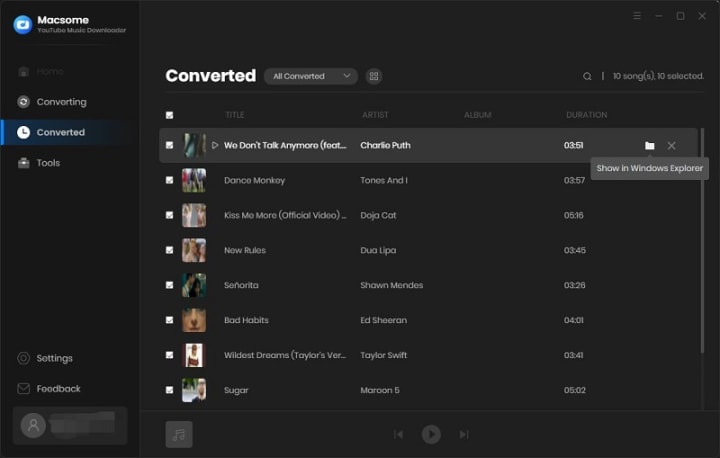
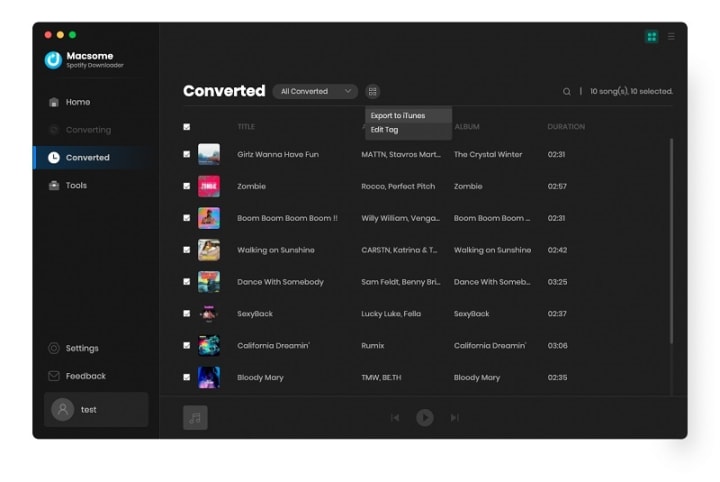
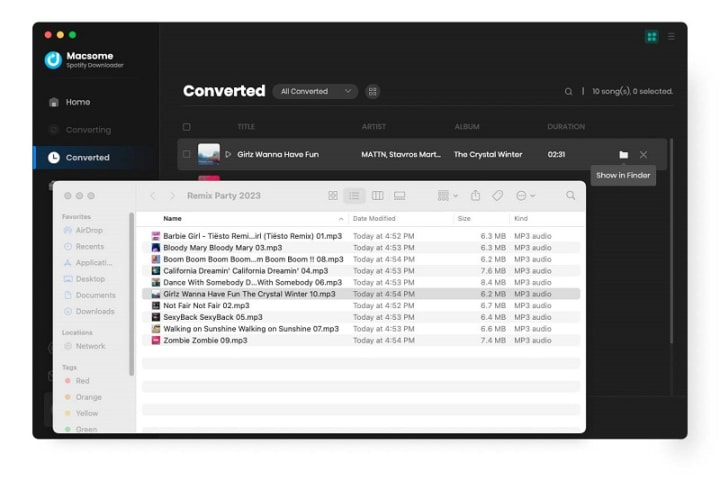
Once the conversion is finished, tap the "Converted" section, and you will find all the downloaded Spotify songs. You can locate the downloaded Spotify files on your local computer by clicking the "Folder" icon.

Here Top 10 Most Streamed Songs on Spotify of All Time


1. "Blinding Lights" by The Weeknd

Overview: Released in 2019, "Blinding Lights" has become a global sensation, characterized by its retro 80s synth-pop sound. The song's catchy melody and relatable lyrics have contributed to its massive streaming numbers.


2. "Shape of You" by Ed Sheeran

Overview: Ed Sheeran's "Shape of You" is a pop anthem that has captivated listeners worldwide. Released in 2017, its infectious beat and memorable chorus have made it a staple on playlists everywhere.


3. "Dance Monkey" by Tones and I

Overview: "Dance Monkey" by Tones and I took the world by storm with its unique vocals and catchy rhythm. The song's success on streaming platforms has solidified its place among the most streamed tracks.


4. "Rockstar" by Post Malone ft. 21 Savage

Overview: This collaboration between Post Malone and 21 Savage has become a hip-hop classic. Its laid-back vibe and memorable hook have resonated with audiences, leading to impressive streaming numbers.


5. "Someone You Loved" by Lewis Capaldi

Overview: Lewis Capaldi's emotional ballad "Someone You Loved" has touched hearts around the world. Its heartfelt lyrics and powerful vocals have contributed to its status as one of Spotify's most streamed songs.


6. "Sunflower" by Post Malone and Swae Lee

Overview: Featured in the "Spider-Man: Into the Spider-Verse" soundtrack, "Sunflower" is a feel-good track that has gained immense popularity. Its upbeat tempo and catchy melody have made it a streaming favorite.


7. "Señorita" by Shawn Mendes and Camila Cabello

Overview: The chemistry between Shawn Mendes and Camila Cabello in "Señorita" is undeniable. This romantic duet has captivated listeners and secured its place among Spotify's top streamed songs.


8. "Believer" by Imagine Dragons

Overview: "Believer" by Imagine Dragons is an empowering anthem that has resonated with fans worldwide. Its driving beat and motivational lyrics have contributed to its streaming success.


9. "Bad Guy" by Billie Eilish

Overview: Billie Eilish's "Bad Guy" is a genre-defying track that has captured the attention of millions. Its unique sound and edgy lyrics have made it a standout hit on Spotify.


10. "Closer" by The Chainsmokers ft. Halsey

Overview: "Closer" is a collaboration between The Chainsmokers and Halsey that became a defining song of the 2010s. Its catchy chorus and relatable lyrics have made it a streaming powerhouse.


Thursday, November 21, 2024

Macsome Inc. Launches Biggest Black Friday Special Deals

Macsome Inc. has launched a massive Black Friday sale. The promotion has started and it will expire on December 2, 2024, everyone can enjoy up to $110 off to get all Macsome featured products. Don't miss the biggest promotion of the year.


Macsome Inc., a global leader in multimedia software development, has launched its big Black Friday sales promotion. During the promotions, users can enjoy up to 42% discount on Macsome's annual subscriptions, save up to $50 on Macsome's lifetime version. For the new all-in-one streaming music downloader, users can enjoy up to $110 off the lifetime version.

From now until December 2, 2024, customers can enjoy significant discounts on a wide selection of Macsome's flagship products available on Macsome's promotional website.

https://www.macsome.com/promotion/

Highlighted Deals and Promotions of Macsome Featured Products


  • Macsome is offering up to 25% off its annual subscription streaming music conversion tools for Black Friday (original price: $59.95, now: $44.95), including Macsome Spotify Downloader, Macsome Apple Music Converter, Macsome YouTube Music Downloader, Macsome Amazon Music Downloader, Macsome Deezer Music Converter, Macsome Tidal Music Downloaders, Macsome Pandora Music Downloader, and Macsome Audiobook Converter.
  • Macsome is offering up to $50 off the lifetime version of its music download software (original price: $129.90, now: $79.90), which allows you to download music from Spotify, Apple Music, YouTube Music, Amazon Music, Tidal, Deezer, Pandora, and the Audible website without any restrictions.
  • Users can also get an all-in-one music streaming downloader at up to $110 off. Macsome Music One lets you download music from Spotify, Apple Music, Amazon Music, Tidal, Deezer, YouTube Music, Line Music, and Pandora Music. You can also record audio files from popular sites such as YouTube, Qobuz, Dailymotion, Veoh, Vimeo, SoundCloud, etc. This product has an intuitive interface that's perfect for beginners and professionals alike.

A brief introduction to the product featured in the promotion of Macsome

  • Macsome Music One - Download songs, playlists, albums, audiobooks, or podcasts from Spotify, Apple Music, YouTube Music, Tidal, Pandora, Amazon Music, Pandora, Line Music, or other popular audio or video sites.


  • Spotify Music Downloader - Download Spotify music tracks, playlists, albums and podcasts in MP3, AAC, WAV, FLAC, AIFF and ALAC formats.
  • Apple Music Converter - Convert Apple Music, iTunes purchased songs, and iTunes/Audible audiobooks to MP3, AAC, WAV, FLAC, AIFF, and ALAC.
  • YouTube Music Converter - Available for both free and premium YouTube users to convert YouTube music to MP3, AAC, WAV, FLAC, AIFF, and ALAC.
  • Deezer Music Converter - Convert Deezer music to MP3, AAC, etc. with Hi-Fi audio quality.
  • Pandora Music Converter - Download Pandora Music songs, albums, playlists and podcasts to MP3, AAC, WAV, FLAC, etc.
  • Tidal Music Downloader - Download music from Tidal in MP3, AAC, WAV, FLAC, AIFF and ALAC with high quality output.
  • Amazon Music Downloader - Download Amazon songs in MP3, AAC, WAV, FLAC, AIFF and ALAC with ID3 tags.

Pricing and Availability

This promotion is valid until 02.12.2024. Customers can access all offers and more information on the Macsome Black Friday promotion:

https://www.macsome.com/promotion/

About Macsome Inc

Macsome Inc is a software development company that was established in 2008. It is devoted to providing ultimate multimedia solutions to customers worldwide. Main products include Spotify Downloader, Apple Music Converter, YouTube Music Downloader, Amazon Music Downloader, Tidal Music Downloader, Deezer Music Converter, Pandora Music Downloader, and the new upgrade of Audible Audiobook Converter.

Press Contact

Name: Leo Fan

Email: market@macsome.com

Website: https://www.macsome.com

Facebook: https://www.facebook.com/MacsomeOfficial

Black Friday Promotion page: https://www.macsome.com/promotion/


Thursday, November 16, 2023

Macsome Launches Super Black Friday Campaign - Save up to $60 OFF

Macsome Inc. has recently released a big Black Friday Campaign. Users can save up to $60 on Macsome’s products. The event will be concluded on Nov. 30, 2023. Don't miss out on the year's biggest promotion. 

Macsome Inc., an industry-leading software developer, has launched its Black Fridaybig sales event. During this promotion, users can enjoy at up to 25% off discount for Macsome’s yearly subscriptions, save up to $40 off on Macsome’s lifetime version, and up to $60 off for all-in-one music downloader - Music One. 

Starting from November 16, Macsome Black Friday & Cyber Monday sale is in progress. Here is the landing page for this campaign:


Macsome 2023 Black Friday Sales Quick Overview

  • Macsome is offering up to 25% off on their yearly subscription streaming music conversion tools for Black Friday (original price: $59.95, now: $44.95, Coupon code: 2023-MS-15Y-B5) , including Macsome Spotify Downloader, Macsome Apple Music Converter, Macsome YouTube Music Downloader, Macsome Amazon Music Downloader, Macsome Deezer Music Converter, and Macsome Tidal Music Downloaders.
  • Macsome is offering up to $40 off on their lifetime version of music downloading software (original price: $129.90, now: $89.90, Coupon code: 2023-MS-40L-B5), allowing you to download music from Spotify, Apple Music, YouTube Music, Amazon Music, Tidal, or Deezer without any limitations.
  • Users can also get an All-in-one Music Downloader at up to $60 off. This Music One program can let you download music from Spotify, Apple Music, Amazon Music, Tidal, Deezer, YouTube Music, Line Music, and Pandora Music. Besides, it also lets you record audio files from popular sites, such as YouTube, Dailymotion, Veoh, Vimeo, SoundCloud, etc. This product with an intuitive interface that's perfect for beginners and professionals alike.
 
A brief introduction to the product featured in the promotion of Macsome

Spotify Music Downloader - Download Spotify music songs, playlists, albums, and podcasts to MP3, AAC, WAV, FLAC, AIFF, and ALAC.


Apple Music Converter - Convert Apple Music, iTunes purchased songs, and iTunes/ Audible audiobooks to MP3, AAC, WAV, FLAC, AIFF, and ALAC.

YouTube Music Converter - Available for both YouTube Free and Premium users to download YouTube Music to MP3, AAC, WAV, FLAC, AIFF, and ALAC.

Deezer Music Converter - Convert Deezer Music to MP3, AAC, etc with Hi-Fi audio quality.

Pandora Music Converter - Download Pandora Music songs, albums, playlists, and podcasts to MP3, AAC, WAV, FLAC, etc.

Tidal Music Downloader - Download music from Tidal to MP3, AAC, WAV, FLAC, AIFF, and ALAC with high output quality.

Amazon Music Downloader - Download Amazon Songs to MP3, AAC, WAV, FLAC, AIFF, and ALAC with ID3 tags.

"To shows our sincere gratitude to all customers, we have offered the biggest discounts during the Black Friday Campaign, and this would be the lowest price of the year," said Leo Fan, marketing manager of Macsome.

For more details about Macsome Black Friday sales, please visit the official promotion page from: https://www.macsome.com/promotion/2023-black-friday-sales/

Pricing and Availability

This promotion is valid until November 30th, 2023. Anyone who visits Macsome official website can enjoy this special discount. Now you can get Annual Plan for Macsome at up to 25% off. This plan now costs $44.95 (original price: $59.95) per year, and save up to $40 on Macsome lifetime versions, giving you access to all the features and updates of Macsome.

For more promotion information, please go to:

https://www.macsome.com/promotion/2023-black-friday-sales/

About Macsome Inc
Macsome Inc is a software development company that was established in 2008. It is devoted to providing ultimate multimedia solutions to customers worldwide. Main products include Spotify Downloader, Apple Music Converter, YouTube Music Downloader, Amazon Music Downloader, Tidal Music Downloader, Deezer Music Converter, Pandora Music Downloader, and the new upgrade of Audible Audiobook Converter. 

Press Contact

Name: Leo Fan

Email: market@macsome.com

Website: https://www.macsome.com

Facebook: https://www.facebook.com/MacsomeOfficial

Black Friday Promotion page: https://www.macsome.com/promotion/2023-black-friday-sales/

Thursday, July 13, 2023

Macsome Announces New User Interface for Its Music Streaming Tools

 Macomse brings a new user interface for its music streaming tools, making them easier to use,  more intuitive, and visually pleasing. 

Macsome announced new user Interface for its music streaming tools. The company's flagship product, a series of two products: the web player series and the comprehensive series. The web player series let you download streaming music from web player, including Amazon Music, Tidal, Deezer, YouTube Music, and Pandora. And the comprehensive series supports downloading from the app and web player, such as Apple Music and Spotify.

And after the new upgrade of this version, Macsome not only brings a new look to the products but new features as well, including Format Converter, CD Burner, and the ability to edit important ID3 tags within the tool (already available within the comprehensive series for a long time).


Each product offers a free trial version, which let you download 1 minute of each track.

How to Download Streaming Music from Web Player

Macsome web player series included Macsome Tidal Music Downloader, Macsome YouTube Music Downloader, Macsome Deezer Music Converter, and Macsome Pandora Music Downloader. Here we will take Macsome You Music as an example to show how it works.

Step 1. Login YouTube Music Web Player

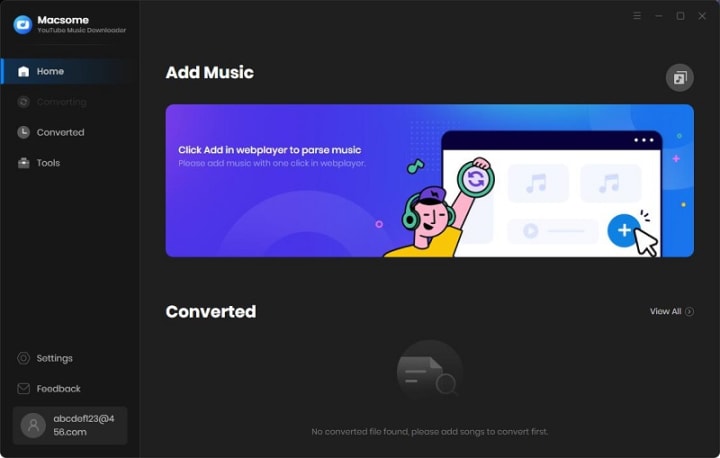
Start Macsome YouTube Music Downloader on your PC, and the YouTube Music web player will open simultaneously. Then log in to your account, the YouTube Music free account is also available.

If the web player doesn't appear automatically, you can manually open it by clicking on the blue section of the main interface or using the "Open the webplayer window" button.

Add a caption (optional)

Step 2. Set the Output Formats and Other Parameters

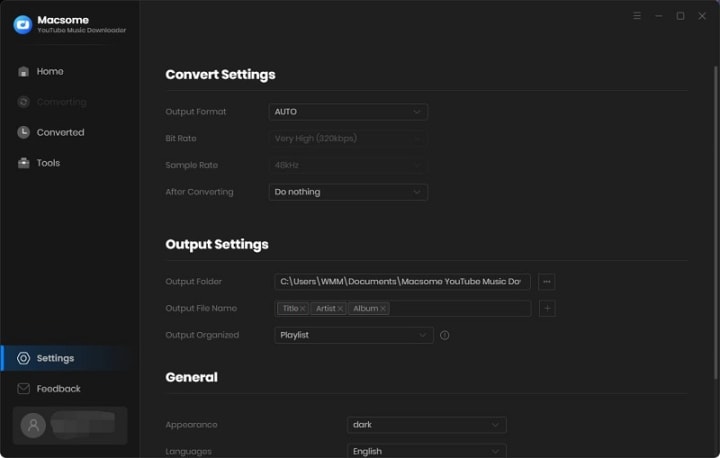
Click on the "Settings" icon on the left, or select the "Settings" option from the drop-down list. Now you can choose the output format, output quality, or output folder as you need.

For better organization of your downloaded YouTube Music files, you can save the output audio files into folders sorted out by artist, album, or playlist. In addition, Macsome allows you to customize the name of the output files and save the output audio files in the same order as the original playlist.

Add a caption (optional)

Step 3. Add Music, Playlists, or Albums from YouTube to Macsome

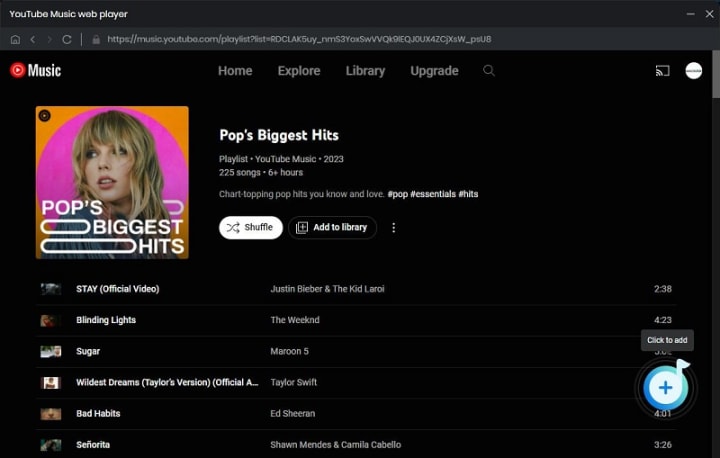
Open a track, album, or playlist, then you can click the "Click to add" button to add the music you want to convert.

Add a caption (optional)

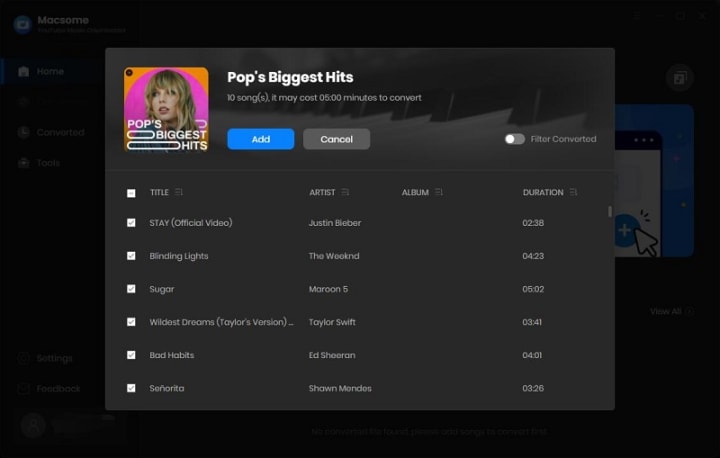
Macsome YouTube Music Downloader will parse the selected playlist and display them in a pop-up window. By default, all items are selected, but you can manually select the songs you want.

Add a caption (optional)

Then, click the "Add" button, all the songs will be listed on the main window. You can click the "Add" button to continue choosing songs from other playlists or albums.

Add a caption (optional)

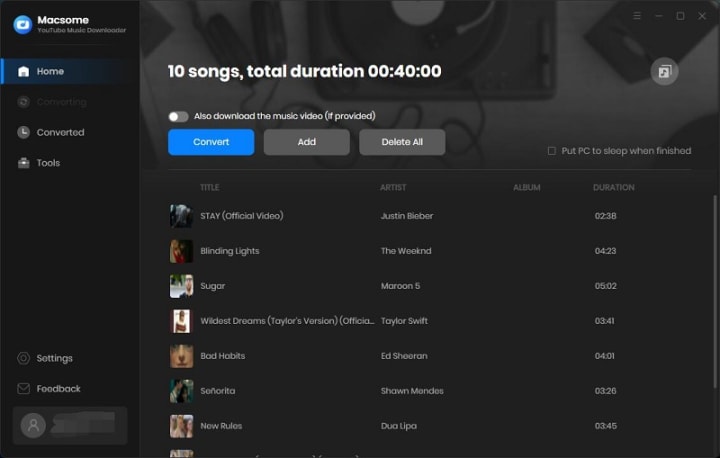
Tips to Download YouTube Music videos: If YouTube Music includes the Music video, please switch on the "Also download the music video (If provided)" option, and then the YouTube Music tracks as well as the Music videos will be downloaded together.

Step 4. Start to Download YouTube Music

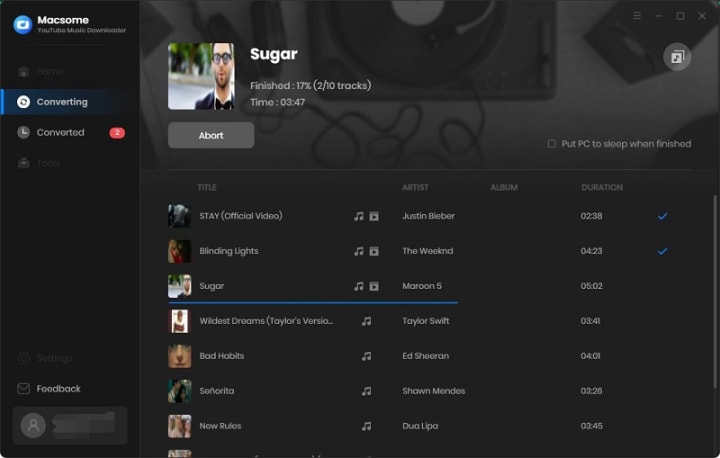
Click the "Convert" button to start downloading music from YouTube.

Add a caption (optional)

After the conversion, you can find the downloading history from the "Converted" tab, hover the mouse over the folder icon, you will find the downloaded YouTube Music files in your local folder. If YouTube Music provided the video, turn on the tab, music videos are downloaded along with the tracks.

Add a caption (optional)

Select all the downloaded songs, you can directly export the downloaded YouTube Music songs to Apple Music, burn YouTube Music to CD, or edit tag information with one click.

How to Download Streaming Music from Web Player and App

Macsome iTunes Music Converter and Macsome Spotify Downloader are comprehensive products, which support downloading Apple Music and Spotify music from the app and web player. We'll show you how it works using Macsome Spotify Downloader.

Step 1. Launch Macsome Spotify Downloader on Mac.

Add a caption (optional)

Step 2. Choose to Record Spotify Music from App or Web Player.

If you select the Spotify App, please make sure you have installed the latest version of Spotify app. When you choose the Spotify App, the Spotify app will open at the same time. Now you can drag the playlist you want to download to the dotted box directly. Plus, you can also copy the link of the playlist to the blue banner, and Macsome will parse the link.

Add a caption (optional)

If you choose to record music from the Spotify web player, the web player will start simultaneously. Please use your Spotify account to log in to the Spotify web player.

Please Note: You'll need to log into your Spotify account before conversion, but don't worry, we won't gain access to your account information other than the songs.

Add a caption (optional)

You can directly open a playlist, an album, or an artist, and tap the "Click to add" icon.

Step 3. Select Spotify Songs to the Macsome.

Then the selected playlist will be recognized and shown in a new window.

Select the songs you want, then click the "Add" button, all the selected songs will be listed in the panel.

Add a caption (optional)

Step 4. Choose Output Format or Other Parameters.

Click on the Setting in the bottom-left corner, you can choose the Output Format (AUTO / MP3 / AAC / FLAC / WAV / AIFF / ALAC), the Bit Rate (320kbps, 256kbps, 192kbps, 128kbps), Sample Rate and the Output Folder. For better organizing your music library, you can save the output audio files into organized folder like Playlist, Artist, Album, Artist/Album, Album/Artist, Playlist/Artist, or Playlist/Album.

Add a caption (optional)

Step 5. Start to Download Spotify Music and Playlists.

After all the settings, you can click on the "Convert" button to start downloading the Spotify songs to the common format you have chosen.

Add a caption (optional)

When the downloading is complete, you can click the "Converted" panel to find the downloaded history. Select the converted songs, you can choose to export Spotify music to iTunes directly.

Add a caption (optional)

Hovering over the music list, and click the "folder" icon, you'll find the downloaded Spotify songs in your local folder.

Add a caption (optional)