Showing posts with label Spotify. Show all posts

Monday, March 31, 2025

Kanye West's new album "Bully" has had a complicated release history, and its availability on music streaming platforms is limited and unconventional.

To listen to Kanye West's new ablbum "Bully" on YouTube, Spotify, or other music streaming platforms. 


Current Availability of Kanye West's "Bully"

  1. Removed from Apple Music: Recent reports, including posts on X and articles from sources like EURweb, confirm that Kanye West’s "Bully" (specifically the version titled "BULLY V1") was briefly available on Apple Music but has since been removed. Kanye himself addressed this on social media, claiming, “APPLE MUSIC REMOVED BULLY V1, BUT THAT WON’T STOP ME MY MUSIC IS BIGGER THAN THEIR PLATFORMS.” The exact reason for the removal isn’t clear, but it could be related to licensing issues, content disputes, or Kanye’s stated opposition to streaming platforms.
  2. Not Widely Available on Major Streaming Platforms: According to multiple sources (e.g., HipHopDX, Rolling Stone, Billboard), "Bully" has not been released in a traditional format on major digital service providers (DSPs) like Spotify, Tidal, or Amazon Music. Kanye has expressed skepticism about streaming services, stating in posts on X and interviews that he believes “streams are fake” and that record labels mistreat artists. As a result, he has avoided putting "Bully" on most mainstream platforms.
  3. Available on YouTube: The primary way to access "Bully" is through YouTube. Kanye released "BULLY V1" as a 45-minute music video/short film featuring his son Saint, which is still available on his official YouTube channel. This version includes nine tracks and visual content, but it’s not a standard album stream—it’s presented as a visual experience. As of recent posts on X and web articles, this YouTube video has garnered significant attention, reaching the top of YouTube’s trending page in the U.S. with over 1.4 million views.
  4. Limited or Unofficial Streams: Some users on X and smaller platforms like SoundCloud have shared links or playlists claiming to host "Bully" tracks, but these are not official releases and may violate copyright. For example, a playlist on SoundCloud titled "KANYE WEST - BULLY V1" exists, but it’s unclear if it’s authorized by Kanye or his team. Relying on these sources is risky and not recommended.
  5. No Confirmation on Other Platforms: There’s no evidence from the available sources that "Bully" is currently available on Spotify, Tidal, Amazon Music Unlimited, or other major streaming services. Posts on X and articles suggest that Kanye may be holding off on a full release, possibly waiting until June 15, 2025 (his daughter North’s birthday), as he originally planned. However, his recent behavior and statements indicate he might continue to bypass traditional streaming altogether.
Why the Confusion?
Kanye’s release strategy for "Bully" has been unconventional and controversial. He initially announced the album in September 2024 during a show in China and previewed tracks like “Beauty and the Beast.” However, the official release on March 18, 2025, came as a surprise via X (Twitter) and YouTube, with three different versions ("screening version," "post Hype version," and "post post Hype version"). He later removed some versions and faced backlash for using AI-generated vocals for half the album, as well as for his ongoing controversial social media posts, including antisemitic remarks and attacks on other artists.
His decision to avoid DSPs stems from his belief that streaming platforms and record labels exploit artists, as he mentioned in posts on X and interviews. This has left fans scrambling to find the album, with only YouTube offering a semi-official way to experience it.
Recommendation
If you want to listen to Kanye West’s "Bully," your best and most reliable option right now is to check his official YouTube channel. Search for “BULLY V1” or look for the 45-minute short film featuring his son Saint. Be aware that this is not a traditional album but a visual project with music in the background.
For future updates, keep an eye on Kanye’s social media accounts (like X and Instagram) and official announcements. There’s a chance he might release a more polished version on streaming platforms later, possibly around June 15, 2025, but nothing is confirmed. Posts on X suggest fans are divided—some are excited about the YouTube release, while others are frustrated by its limited availability and Kanye’s behavior.
If you’re looking for a specific track, like the single “WW3,” it was officially released on streaming platforms as of March 27, 2025, according to some sources, but the full album remains off most DSPs.
Final Note
The availability of "Bully" is fluid and subject to change, given Kanye’s unpredictable approach. For now, YouTube is the only major platform where you can find a version of the album. If it becomes available on other streaming services like Spotify or Apple Music in the future, it will likely be announced on social media or through music news outlets. Stay tuned, but don’t expect a traditional release anytime soon based on his current stance.


Tuesday, February 25, 2025

Spotify Will Release Spotify Pro with high-quality audio (HiFi)

 Spotify is planning to introduce a new additional subscription tier called Music Pro, which will cost $6 in the United States, in addition to the existing subscription plans.

This new plan includes long-awaited features, such as high-quality audio (HiFi), which was first announced in 2021, but whose implementation has not yet been realized.

Users who choose the Music Pro plan will have access to remix tools, as well as the possibility of getting tickets for concerts. These benefits are in addition to the ability to mix songs from different artists using artificial intelligence, which promises to transform the listening experience on the platform.

Spotify Pro Reiview & Pro and Cons & Prices

Spotify Pro, also known as Spotify Music Pro, is a subscription service that will offer high-quality audio and other perks. It’s expected to be available by the end of 2025. Features

  • Lossless audio: Spotify Pro will offer high-quality audio, including lossless audio
  • Concert tickets: Spotify Pro will offer access to presales and better seats for concerts
  • Song mixing: Spotify Pro will allow users to mix songs from different artists together
  • Artificial intelligence: Spotify Pro will use artificial intelligence to provide extra perks

Cost

  • Spotify Pro will cost an extra $6 per month on top of the Spotify Premium plan
  • The Spotify Premium Individual plan costs $11.99 per month
  • The Spotify Premium Duo plan costs $16.99 per month
  • The Spotify Premium Family plan costs $19.99 per month
  • The Spotify Premium Student plan costs $5.99 per month

Competition

Spotify Pro will compete with Apple Music, TIDAL, and Deezer, which have been popular with audiophiles.

Will you upgrade to Spotify Pro

Maybe I will not. $18 per month is too expansive for me. To get high-quality audio, I can subscribe to Tidal, Amazon Music, or Apple Music, even Qobuz. Others streaming services’ monthly prices are more cheaper.

You can also use Macsome Spotify Downloader to stream music, podcasts, or audiobooks from Spotify to listen offline. It doesn’t need a Premium subscription.

A new fee that depends on the artists themselves

However, it is important to note that Spotify is still in talks to negotiate the necessary rights with major music companies, which could affect the availability of these features.

The total cost for users who wish to combine the Music Pro plan with their base subscription could reach approximately $18 per month, although prices may vary by region. As Spotify prepares to launch this new subscription tier, a phased rollout is anticipated globally.

However, despite the ambitious plans for Music Pro, doubts remain about the platform’s ability to deliver on these improvements, especially given that there have been significant delays in the implementation of high-quality audio enhancements in Spotify Premium in the past.

Wednesday, May 8, 2024

Macsome Inc. Announced New Macsome Music One

Macsome Inc., a professional software development company, is thrilled to announce the launch of new all-in-one streaming music converter - Macsome Music One. It is aim to download music from popular streaming platforms, online video platforms, or other websites.

Learn more about Macsome Music One https://www.macsome.com/music-one/

Macsome Music One is an all-in-one recording solution that can download music from multiple streaming services, including Spotify, Apple Music, Amazon Music, Tidal, YouTube Music, Deezer, Pandora Music, Audible and Line Music. You can also record audio directly from popular online video platforms or other websites, including YouTube, SoundCloud, Dailymotion, Vimeo, Veoh, etc. Macsome Music One also allows users to export music to simple output formats, preserving ID3 tags such as title, artist, year, track number, etc.


Macsome Music One is a powerful multimedia recorder that can not only download songs from any streaming provider or music video portal, but also offers advanced built-in features. AA/AAX Converter allows registered users to convert local Audible audio books to MP3, M4A and M4B at up to 100x faster speed. Format Converter lets you convert local audio files to popular audio formats, including MP3, M4A, FLAC, WAV, OGG or AIFF. CD Burner lets you burn Apple Music and other audio files from your computer onto CDs. The free Tag Editor lets you edit all the important and useful metadata.

Key Features of Macsome Music One:

  • Download music from Spotify, Apple Music, Amazon Music, Tidal, YouTube Music, Deezer, Pandora and Line Music.
  • Record music from popular websites such as YouTube, SoundCloud, Dailymotion, Vimeo, Veoh and more.
  • Download audio books or podcasts from the Audible website at up to 300 times faster speed.
  • Convert streams to MP3, AAC, WAV, FLAC, AIFF or ALAC without quality loss.
  • Preserve almost all original ID3 tags, including title, artwork, album, track numbers and more.
  • Preserve original audio quality such as Spotify 320kbps, Apple Music Lossless (Hi-Res), Amazon Music HD & Ultra HD, Tidal Hi-Res MQA, Deezer HiFi and more.
  • Support up to 10x conversion speed and adjust the conversion speed to suit your needs.
  • Provides a versatile and easy-to-use toolkit that includes AA/AAX Converter, CD Burner, Tag Editor, local audio converter, and 1-click export of music to iTunes.
  • Support for downloading lyrics and saving them as .lrc or .txt files.
  • Support for downloading music from the web player or music streaming applications.

How to Use Macsome Music One

1. Download, install, and launch Macsome Music One on your Windows and Mac.

2. Select music source you want. Here you can select streaming music service or website, or other websites, such as YouTube, SoundCloud, Dailymotion, Veoh, Vimeo, etc. Here we will take the YouTube website as an example.


3. Select the output format, and output quality.

4. Browser the content you want to record, then click the blue "Click to Start" button on the main interface to start recording. After recording, click "Stop." Then, the recorded songs will be automatically saved to the output path you set.


5. After the recording process finished, you can find the audio files in the “Recorded” panel.

Pricing and Availability


Macsome Music One offers a free trial that allows you to download one minute of each track.

To unlock the limit, users must upgrade to the full version, which costs from $29.95 for a one-month licence, $79.90 for a one-year licence and $159.90 for lifetime use.

All packages can only be used on one computer, but come with free software updates and technical support. In terms of availability, it works well on all Windows and Mac platforms, including the latest Win 11 and MacOS 10.15 or higher.

About Macsome Inc.

Macsome Inc is a professional software provider, , offering high quality multimedia software to help customers enjoy digital world better. Its main products include Macsome Music One, Spotify Downloader, Apple Music Converter, YouTube Music Downloader, Amazon Music Downloader, Tidal Music Downloader, Deezer Music Converter, Pandora Music Downloader, and Audible Audiobook Converter.

Press Contact

Name: Leo Fan

Email: market@macsome.com

Website: https://www.macsome.com

Facebook: https://www.facebook.com/MacsomeOfficial

Macsome page: https://www.macsome.com/music-one/

Wednesday, December 20, 2023

YouTube to Spotify - How to Convert YouTube Music to Spotify

Transferring your favorite music from YouTube to Spotify can be a convenient way to streamline your music collection and enjoy all your tracks in one place. While there isn't a direct way to transfer music from YouTube to Spotify, there are several methods you can use to achieve this. In this article, we'll explore different ways to transfer your YouTube Music to Spotify, so you can seamlessly enjoy your favorite tunes on the go.

1. Use a Third-Party Converter - Macsome YouTube Music Downloader

There are several third-party playlist converters that can help you transfer your YouTube Music to Spotify. These tools allow you to import your YouTube playlist and convert it into a format that can be easily imported into Spotify. 

Macsome YouTube Music Downloader is one of the best YouTube Music Converter you can choose. With it, you can download YouTube Music songs, albums, playlists, and music videos to your local folder. Besides, it can also convert YouTube Music to MP3, AAC, WAV, FLAC, AIFF, and ALAC with original output quality, so that you can upload the downloaded YouTube Music files to Spotify.

Detailed Steps to Convert YouTube Music to Spotify

In this section, you will learn how easy it would be to download YouTube Music to MP3 and upload local YouTube Music songs to Spotify without having to use YouTube Premium.

Step 1. Launch Macsome YouTube Music Downloader

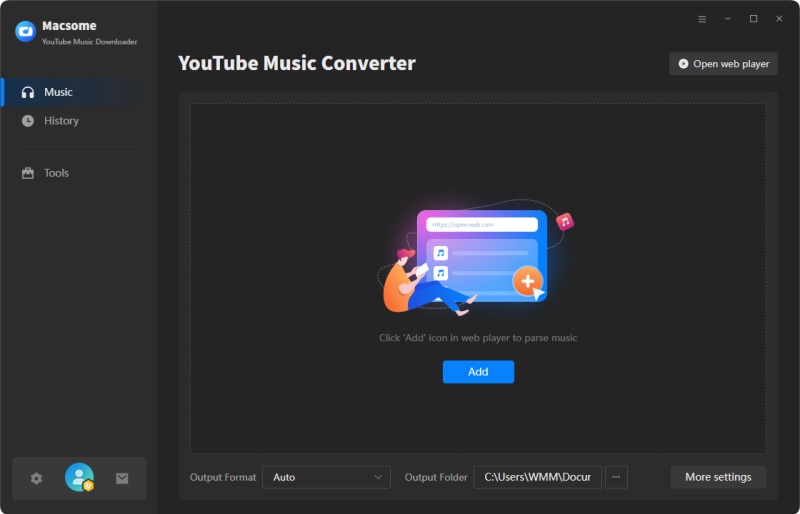
Download, install, and launch Macsome YouTube Music Downloader on your computer, and the built-in YouTube Music web player will start at the same time. Then sign in to your free YouTube Music account.


Step 2. Choose MP3 as the Output Format

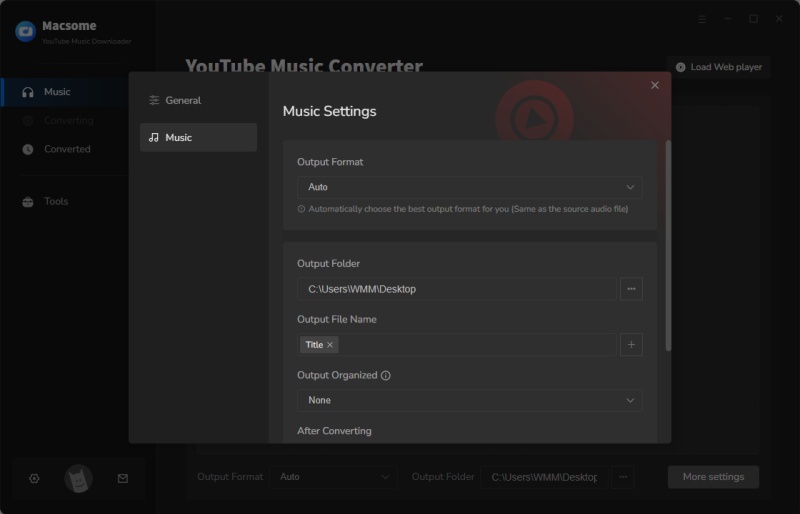
Click on the Settings icon in the lower-left corner of the window to choose the output format, output quality, output folder, and more output parameters. 


Step 3. Add YouTube Music Tracks and Playlists

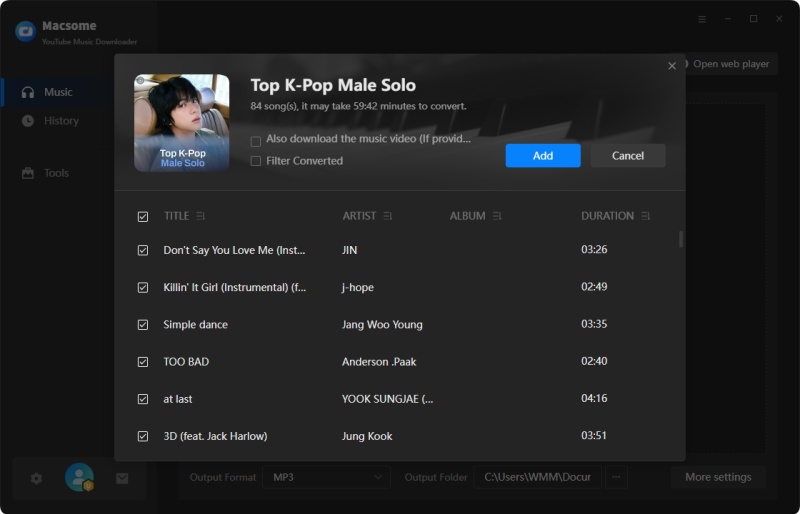
In the YouTube Music web player, you can browse the music library to select songs or directly open playlists that you want to download. Then, you can tap the "Click to add" button on the right side to import the desired songs. Click the "Add" button, Macsome will list the selected songs for you.


Step 4. Start to Download YouTube Music to MP3

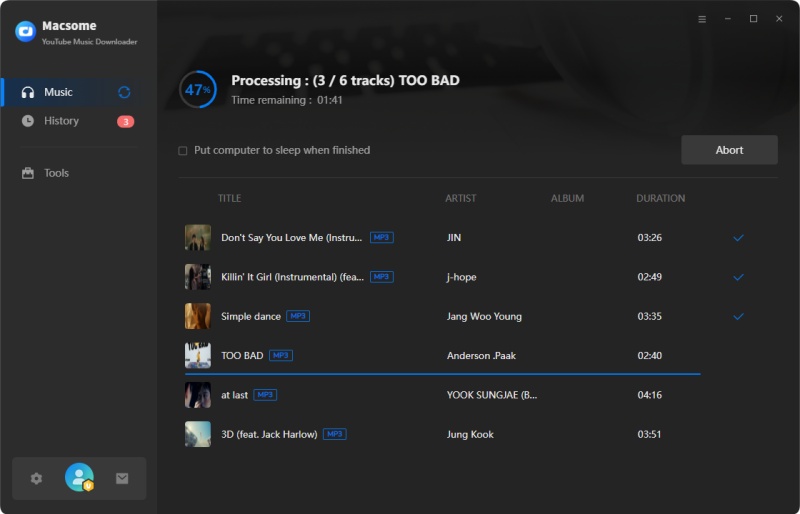
Finally, simply click the "Convert" button to start downloading YouTube Music with your YouTube Music Free account.


Step 5. Upload YouTube Music to Spotify

Now that your favorite YouTube Music playlist has been downloaded and saved in your local folder, you can transfer your YouTube Music playlist to Spotify.

Open the Spotify desktop app on your Windows PC or Mac and sign into your account. Click the drop-down menu next to your account name and choose Settings. Scroll down the Settings screen to the Local Files section, and toggle the Show Local Files switch.

Select Show songs from Downloads or Music Library (or both). Select Add a source and upload the local folder where your YouTube Music playlist is stored. Now you can listen to the uploaded YouTube Music songs with the Spotify desktop app. All the songs stored in the chosen local folder will appear in the Local Files folder on Spotify.

 2. Convert YouTube Music to Spotify Using Soundiiz

Soundiiz is a popular online platform that allows you to transfer music playlists between different streaming services, including YouTube and Spotify. 

Simply create an account on Soundiiz, connect your YouTube and Spotify accounts, and use the platform's intuitive interface to transfer your music playlists with ease.

The similar products include Tune My Music and Free Your Music.

Conclusion

In conclusion, while there isn't a direct method for transferring music from YouTube to Spotify, there are several effective ways to achieve this. Whether you choose to use third-party tools, manual methods, or automation platforms, transferring your favorite YouTube Music to Spotify can enhance your listening experience and simplify access to your favorite tracks. By following these methods and considering copyright implications, you can enjoy a seamless transition of your music collection from YouTube to Spotify.

Thursday, November 19, 2020

Thanksgiving Day & Black Friday offers – Get Macsome Products Up to 50% Off

 To celebrate the Thanksgiving Day, Macsome Inc. official announced their 2020 Black Friday Big sales with up to 50% on the Macsome media converter products to customers worldwide. The event is going to begin in Nov. 24th, 2020 and expires at Nov. 30th, 2020.   

As the holidays approach, The Thanksgiving Day & Black Friday special promotion from Macsome Inc. will start from Nov. 24th 2020 to Nov. 30th, 2020. Anyone can get all Macsome featured programs with big discounts from 20% to 50%, including the newly launched Macsome Amazon Music Downloader, Macsome Tidal Music Downloader and Macsome Any Audiobook Converter. The popular Spotify Downloader and iTunes Converter. 


Main Functions of Macsome New Programs 


Macsome Amazon Music Downloader was newly launched last month. It is specially developed to download Amazon Music Unlimited & Prime Music without Amazon Music application installed. Besides, it can also convert Amazon music to MP3, FLAC, WAV and AAC with ID3 tags kept. 


Another featured new program available in the sales promotion is Macsome Tidal Music Downloader. It is a powerful Tidal Music Converter, which is able to download Tidal Music, playlist and albums to MP3, AAC, WAV and FLAC with hi-fi output quality. 


Macsome Audiobook Converter can convert Audible audiobooks to MP3, M4A and M4B at up to 60x faster speed. It you set the M4A as the output format, you can also keep the primary chapter information for the output files. 


Currently all of Macsome streaming music converters are fully compatible with macOS 10.15 Catalina and Windows 10. And all of them have a free trial version, which let you download it for free and have a trial.  


The following listed the lowest discounted prices for all Macsome programs for sale for 2020 Thanksgiving Day as well as Black Friday for your reference: 


Macsome Amazon Music Downloader for Win                50% off             $9.95 (Original $19.95) 

Macsome Tidal Music Downloader (Mac/Windows)   50% Off    $9.95 (Original $19.95) 

Macsome Audiobook Converter (Mac/Windows)       50% Off    $9.95 (Original $19.95) 

Macsome iTunes Converter (Mac/Windows)   20% Off    $14.95 (Original $19.95) 

Macsome Spotify Downloader (Mac/Windows)       20% Off   $14.95 (Original $19.95) 


Pricing and Availability 


2020 has been difficult for everyone. And Macsome Inc. want to make the holiday special. Regardless of how the people plan to celebrate Thanksgiving, Macsome Inc is committed to ensuring their customers can find what they want, all at affordable prices.  


This promotion is valid from Nov 24th, 2020 until Nov 30th, 2020. Anyone who visit Macsome official website can enjoy the special discount.  For more details about Macsome 2020 Thanksgiving Day and Black Friday sales, please visit the official promotion page from: http://macsome.com/promotion/thanksgiving-day-special-sales-offer.html 


About Macsome Inc 

Macsome Inc is a software development company which established in 2008. It is devoted to providing ultimte multimedia solutions to customers worldwide. Main products include Spotify Downloader, Amazon Music Downloader, Tidal Music Downloader, Audiobook Converter, and iTunes Converter. 


Press Contact 

Name: Leo Fan 

Email: market@macsome.com 

Website: http://www.macsome.com 

Facebook: https://www.facebook.com/Macsome-349755292112722/