Tuesday, December 4, 2018

The best Apple Music songs of 2018

Apple-presents-best-of-2018-Music-12032018_big.jpg.large
To close out an extraordinary year, Apple Music’s editors have awarded highest honors to the artists who truly represent the very best of 2018. Drake owns the Artist of the Year category while country’s Kasey Musgraves scores Album of the Year for her dynamic Golden Hour. The fiery collaboration between Cardi B, J. Balvin and Bad Bunny made “I Like It” an easy choice for Song of the Year and Breakout Artist Juice WRLD has been giving everyone “Lucid Dreams” all year long. But these all-stars weren’t the only stars: Apple Music’s global year-end charts and editorial playlists are packed with the year’s biggest hits and favorites from all over the world.

Best Music of the Year
Artist of the Year: Drake
Breakout Artist of the Year: Juice WRLD
Song of the Year: I Like It - Cardi B featuring Bad Bunny & J. Balvin
Album of the Year: Golden Hour - Kacey Musgraves
More Apple Music Tips:

Tuesday, November 27, 2018

How to cast Apple Music to Chromecast Audio

33323
Apple Music is a streaming Music service, and all the Apple Music files are DRM protected. After you have Apple Music's subscription, you can play, enjoy and download these music tracks with the Apple account, but you can't transfer them or copy them to other non-Apple Music player and devices.
If you are Apple Music subscribers and want to cast apple music to Chromecast Audio, what to do?
Macsome Apple Music Converter is a perfect utility to decrypt DRM from Apple Music songs or playlists legally, and convert Apple Music songs to unprotected audio files like MP3, M4A, M4B, FLAC, or WAV losslessly, so you can easily cast the converted Apple Music songs to Chromecast Audio.

Remove DRM from Apple Music so as to stream on Chromecast Audio.

To convert Apple Music songs well, users need to free download Macsome iTunes Converter at first.
Windows Version Download
Mac Version Download
Step 1, After you download the program, double click to install the trial version of Apple Music Converter on your PC, and then run it.
User Interface
Step 2, click the Add button and select the audio files you want to convert from iTunes library.
Add Downloaded Apple Music
After you choose the music files you would like to convert, click "OK", and then all the audio tracks files you selected would be listed on the main window.
Step 3, Set the output format by clicking the Setting icon, here we choose MP3 format. After iTunes Converter V3.0.0, the default conversion speed is super fast. There is no need to set the conversion speed.
Set MP3 as the output format
Step 4, click the Convert button to start converting.
Convert M4P to MP3
After the conversion, you get the unprotected MP3 music files from protected Apple Music files.
Step 5. Upload the converted songs to Google Play music or Plex, and then use Chromecast Audio streaming them.
All the process is very simple, even you are a new user, you can easily use the program to convert your audio files quickly. Why not free download it and take a try.
More Apple Music Tips & Guides:

Monday, November 19, 2018

You can upgrade to Spotify Premium for only R5.99 per month

spotify
To celebrate the upcoming festive season Spotify is offering new users Spotify Premium for just R5.99. New Spotify users can sign up for Spotify free and upgrade to Spotify Premium for only R5.99 per month for the next three months, starting today until 31 December 2018.
Spotify is also unwrapping a playlist of festive covers titled Spotify Singles: Christmas Collection.
The collection features 15 new tracks recorded by an eclectic mix of artists in our studios in Nashville, London and New York City.
Included in the mix is John Legend, singing the Jackson 5 song Give Love On Christmas Day.
The playlist also features two Spanish-language songs, Feliz Navidad performed by Why Don’t We, and El Burrito Sabanero, performed by Aloe Blacc and DMX singing Rudolph the Rednose Reindeer).
More Spotify Tips:

Friday, November 16, 2018

How to backup Apple Music to SD card

Just imagine that you want to stop your Apple Music subscription, and once you stop the subscription, you can't play them any more, even you think that you have downloaded them and still can play and enjoy them after you cancel the subscription.
If you can backup these Apple Music files, you can still play Apple Music songs normally, after you stop the Apple Music subscription and you can play these Apple Music songs on any audio player devices, not only Apple Music Apps and Apple devices.
If we can remove DRM from Apple Music files and then transfer the converted Apple Music files to SD card, and then you can play them anywhere you like.
In the following, we will show you how to backup Apple Music files to SD card, so you can play these converted files via SD card freely.

Remove DRM from Apple Music and backup to SD card

To deal with DRM well, we need Macsome iTunes Converter  for help, which is an all-in-one tool to convert downloaded Apple Music files, and purchased Audiobooks and remove DRM from these protected Audiobooks and downloaded Apple Music files with fast conversion speed and excellent output quality.
In order to start conversion, users need to free download Macsome iTunes Converter at first.
Windows Version Download
Mac Version Download
Step 1, After you download the program, double click to install the latest version of Apple Music Converter on your PC, and then run it.
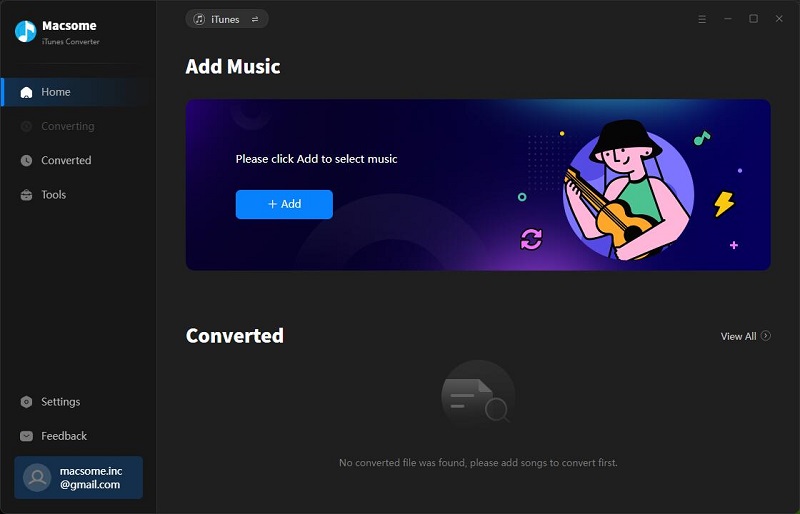
User Interface
Step 2, click the Add button and select the audio files you want to convert from iTunes library.
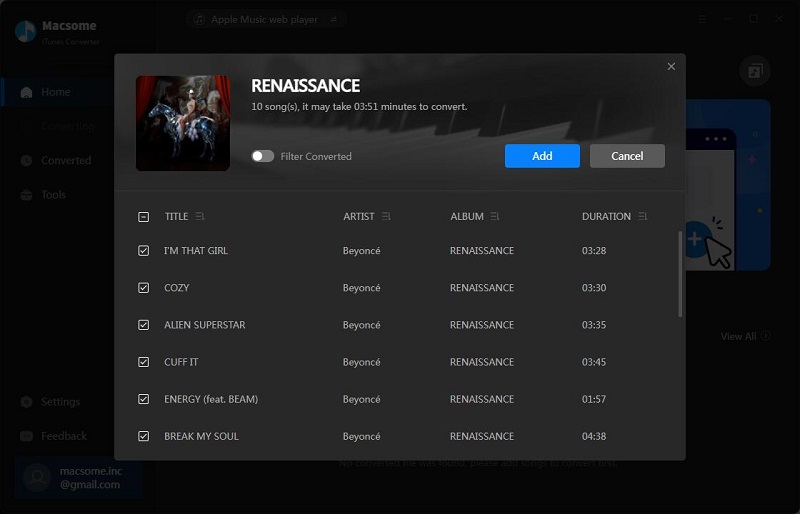
Add Downloaded Apple Music
After you choose the music files you would like to convert, click "OK", and then all the audio tracks files you selected would be listed on the main window.
Step 3, Set the output format by clicking the Setting icon, here we choose MP3 format.
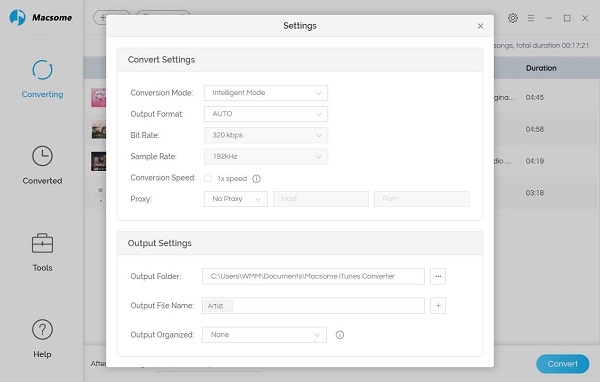
Set MP3 as the output format
Besides MP3 output format, it also supports AAC, FLAC and WAV output formats. You can also reset the output path and organize the output files by Artist, Album, Artist / Album, Album / Artist as you need.
You can also add a track number for the output files, so that you can manage the output files better.
Step 4, click the Convert button to start converting.
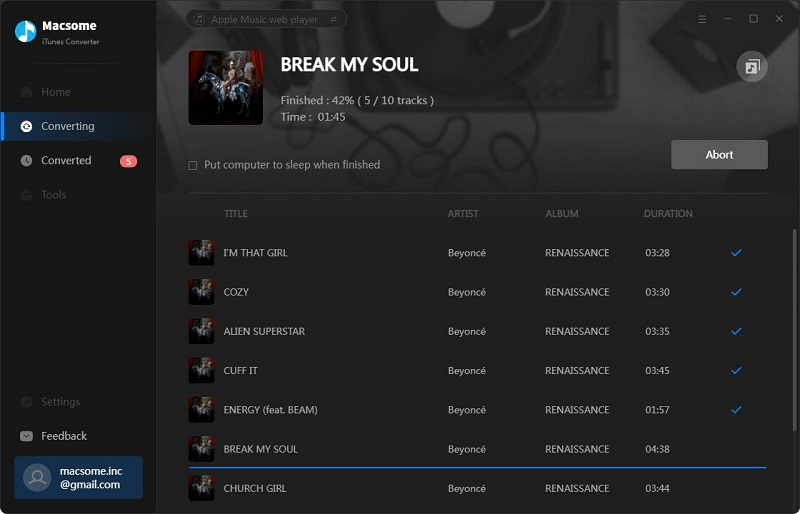
Convert M4P to MP3
Just wait a minute, after the conversion, you get the unprotected MP3 music files from protected Apple Music files.
Now Connect your SD to your computer with a card reader, find the converted files and drag them to your SD card.
After this, you have backup your whole converted Apple Music files to SD card, and then you can play them via SD card freely.
More Apple Music Converter Tips:

Monday, November 12, 2018

Apple Music has launched its ‘Preferred Distribution Program’

apple-music-dark-mode
In choosing three music distributors – namely, CD Baby, The Orchard, and Kontor New Media – Apple will offer clients of these new partners exclusive features via the service. Perks will include advanced analytics and early access to Sales and Trends features in both Apple Music and iTunes.
In order for other distributors to become a “Preferred Plus” partner, they will be expected to cross a threshold of 40,000 songs per quarter with a low Apple Music rejection rate, among other service based criteria. To be a “Preferred” partner, the criteria are similar but the distributor need only cross 10,000 songs per quarter. You can see an image outlining the criteria in greater detail below.
This move from Apple Music follows a similar move from fellow streaming giant Spotify, who recently revealed its own ‘preferred’ digital distributor list.
All of this could also indicate, on a speculative basis, that Apple Music could soon be following in the footsteps of Spotify in introducing a feature that could allow independent artists upload their own music without any need for a record label or third-party aggregator.
While Spotify’s introduction feature is still in it’s Beta stages, it was revealed last week that in order for artists to fully avail of the service, it is likely they will have to pay.
Apple have, as of yet, made no statement as to whether they could be heading in this direction.
More Tips About Apple Music you want to know:

How to Sync and Transfer Apple Music songs to iPod Shuffle

Monday, November 5, 2018

Tips to share Apple Music Playlist with your friends

dims
Any streaming music you've added to your library from the Apple Music catalog are DRM protected, to say in other words, you can play, listen to and enjoy these music files and download as well during your subscription. However you can’t backup, copy, move or share with others directly.
If you still want to know how to share Apple Music Playlist with your friends, removing DRM from the Apple Music is the final solution.
What you need to do is free download one Apple Music DRM removal, Macsome iTunes Converter is the tool used to decrypt DRM from Apple Music and convert Apple Music files to MP3, AAC, FLAC and WAV with fast conversion speed and perfect output quality.
Now follow the next guide to remove Apple Music's DRM and then share with your friends.

Fast guide to remove Apple Music's DRM and convert to MP3

First of all please go to free download the latest version of Macsome iTunes Converter for Windows, and follow the next instructions, and finish the conversion.
Windows Version Download
Mac Version Download
Step 1, Please install the latest version of iTunes Music Converter on your PC, and then run it.
User Interface
Step 2, click the Add button, now you can choose the total playlist you wan to share with your friends.
Load Downloaded Apple Music
After you load all the music songs you want to convert, click "OK", and then all the audio tracks files you selected would be listed on the main window.
Step 3, Set the output format by clicking the Setting icon.
Macsome iTunes Music Converter offers users 4 choices including MP3, AAC, FLAC and WAV formats for you to choose. According to the requirements, here we choose MP3 audio format as the output formats.
Set MP3 as the output format
Step 4, click the Convert button to start converting.
Convert M4P to MP3
After the conversion, the whole Apple Music playlist's DRM has been removed, and the you can copy or unpacked the converted files to your friends.
More related you want to read: