Showing posts with label aa converter. Show all posts

Sunday, July 7, 2019

How to play Audible Audiobook on MP3 player

We know that Kindle Audiobook are purchased from Audible.com, and people can use Audible.com to download audiobooks to your iPhone, Android, Windows Phone, Kindle or other listening device and listen to Audible audiobooks by best-selling authors anytime.
After you paid the Audiobook, you can listen to the Audiobook after you authorize the device, for the DRM limits you.
Would you like to get rid of the DRM from the paid Audiobook?
Here Macsome iTunes Converter can help you, which supports converting audiobooks and apple music even on the latest iTunes and supports saving audiobook's chapters when you convert to AAC format. But it don't support the split function.
All the steps to get rid of the DRM are quite simple, and no additional app to install.
First, free download the software according to your computer system, and install it on your computer.
Windows Version Download
Mac Version Download
Then run the iTunes Music Converter, and choose the Audio book files you want to convert from the iTunes Books library.
Please make sure that you have authorized the purchased Audiobooks to the device or the computer so as to play them normally.
And now click Profile button and select the required profile in Output File Format drop-down list.
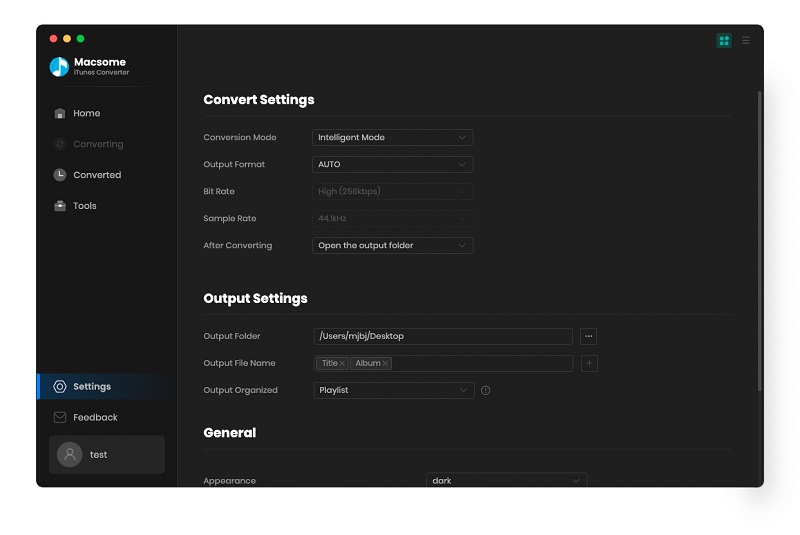
Preferences output Settings
You can also click the software menu and select Preferences to customize the Output Settings by clicking Choose... to set the destination.
Finally, click the Convert button to start the conversion. Meanwhile the paid Audiobook's DRM is removed as well.
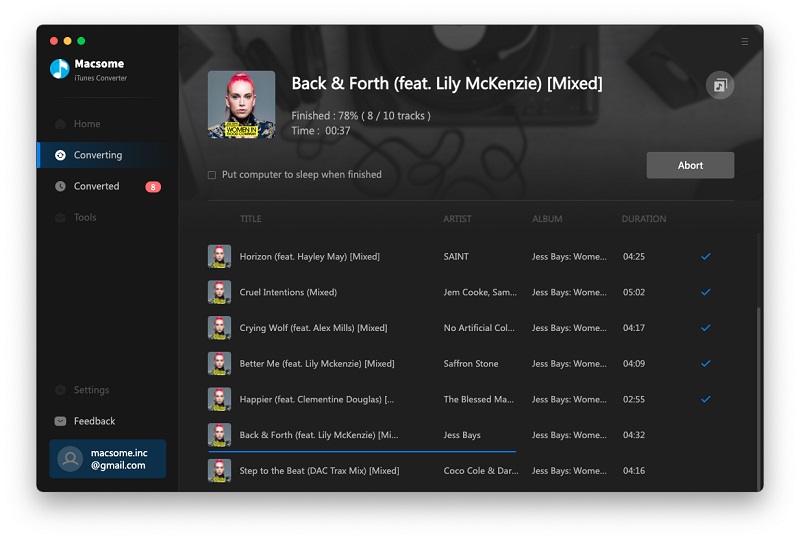
Converting Audio books to MP3
After the conversion is done, you can play the purchased Kindle Audiobook on any MP3 or other audio player as you like without DRM any more.


Thursday, December 15, 2016

How to convert Audiobook AAX to MP3 on Mac

audio-books-listen
You know that all purchased Audiobooks are AA or AAX protected formats. There are full with limitations that you can’t play or listen to Audiobooks on any devices as you like.
If you want to listen to them on a new audio player, you will find it won’t work unless you can authorize them at first.
Have you ever thought of converting these AAX audiobooks to MP3 format, and then you can play these converted MP3 audiobooks without limitation any longer?
You can try  Macsome Audio Book Converter , which can convert kinds of iTunes AA / AAX AudioBooks to MP3, AAC format, and split these big audiobooks to small pieces with chapter kept.
Step-by-step guide to convert AAX to MP3 format.
If you have purchased one Audiobook, make sure that you have authorized it to your computer.
Step 1, go to free download the latest version of Macsome Audio Book Converter,  and then install and run it. The software will load all the playable audiobooks from the iTunes Books library automatically.
add-itunes-audiobooks
Step 2. Click Profile button and select the required profile in Output File Format drop-down list. You can also click the Macsome AudioBook Converter menu and select Preferences to customize the Output Settings by clicking Choose... to set the destination.
set-output-format
Step 4. Click the Convert button and then the selected files will be listed in the window that pops up. And the Status will keep updating the status of the files until that the conversion finished.
convert
After the conversion is done, you can play the converted MP3 or AAC files wherever you like.
You can also know more about AudioBook AAX to MP3 Converter for Mac.
You may like to read:

Thursday, November 13, 2014

How to Convert AA/ AAX audiobooks to MP3 on Mac


Description: If you want to play Audible AA/ AAX files on any popular portable MP3 player, what you need to do is to remove Audible DRM protection and convert AA/ AAX to MP3. As an all-in-one audio DRM removal, AA converter and audio splitter, Macsome Audiobook Converter can deal with it.

Generally the audiobooks purchased from iTunes Store are in AA/ AAX format with Audile's own Digital Right Management (DRM), which prevents owners from disseminating the audiobooks as well as playing the AA/ AAX files on non-Audible Ready compatible players like Creative Zen, Zune, PSP, Sony Walkman, Blackberry, etc. If you want to listen to Audible AA files on any popular portable media player, you need to do is to remove Audible DRM protection and convert AA/ AAX to MP3.
As an all-in-one audio DRM removal, AA converter and audio splitter, Macsome Audiobook Converter can deal with it. With Macsome Audiobook Converter, you can remove DRM from protected Audiobooks and convert AA/ AAX to MP3 with high output quality. Besides, it can also split audiobooks by the duration, the number of segments or chapters. Following the guide below, it is simple to convert AA/ AAX audiobooks to MP3.
Step 1: Select AA/ AAX Audiobooks
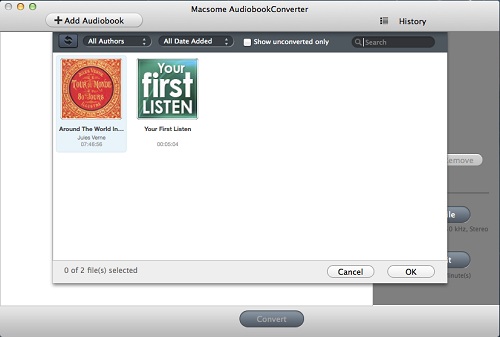
Start Macsome Audiobook Converter and the audiobooks files are auto loaded from the iTunes Books library on the list.
Select and check on the AA/ AAX Audiobooks.
Step 2: Set the profile
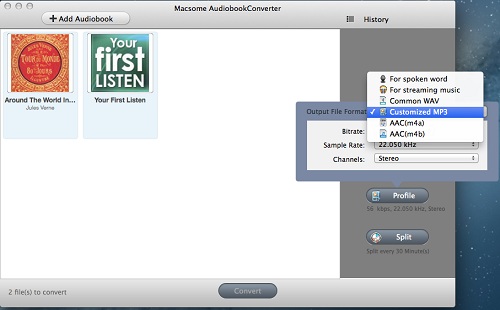
Click Profile button and select Customized MP3 as the output format in the drop-down list.
Step 3: Start the conversion
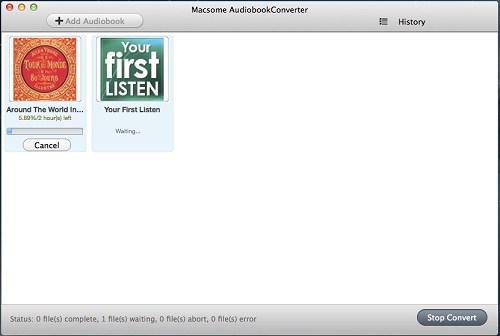
Click Convert button to start AA to MP3 audiobooks conversion with the default output path.
After the conversion, you can get the audiobooks without the DRM protection, and even directly transfer the converted MP3 files to portable devices.
Macsome Audiobook Converter can support dragging AA/ AAX audiobooks from your disc or other location to the list with selected. In addition, if you want to split the big audiobooks, just set the splitting method according to your demand. You can also keep the chapters of audiobooks.
Want to know more about Macsome Audiobook Converter, view:
http://www.macsome.com/audio-book-converter-mac/index.html