Wednesday, May 8, 2024

Macsome Inc. Announced New Macsome Music One

Macsome Inc., a professional software development company, is thrilled to announce the launch of new all-in-one streaming music converter - Macsome Music One. It is aim to download music from popular streaming platforms, online video platforms, or other websites.

Learn more about Macsome Music One https://www.macsome.com/music-one/

Macsome Music One is an all-in-one recording solution that can download music from multiple streaming services, including Spotify, Apple Music, Amazon Music, Tidal, YouTube Music, Deezer, Pandora Music, Audible and Line Music. You can also record audio directly from popular online video platforms or other websites, including YouTube, SoundCloud, Dailymotion, Vimeo, Veoh, etc. Macsome Music One also allows users to export music to simple output formats, preserving ID3 tags such as title, artist, year, track number, etc.


Macsome Music One is a powerful multimedia recorder that can not only download songs from any streaming provider or music video portal, but also offers advanced built-in features. AA/AAX Converter allows registered users to convert local Audible audio books to MP3, M4A and M4B at up to 100x faster speed. Format Converter lets you convert local audio files to popular audio formats, including MP3, M4A, FLAC, WAV, OGG or AIFF. CD Burner lets you burn Apple Music and other audio files from your computer onto CDs. The free Tag Editor lets you edit all the important and useful metadata.

Key Features of Macsome Music One:

  • Download music from Spotify, Apple Music, Amazon Music, Tidal, YouTube Music, Deezer, Pandora and Line Music.
  • Record music from popular websites such as YouTube, SoundCloud, Dailymotion, Vimeo, Veoh and more.
  • Download audio books or podcasts from the Audible website at up to 300 times faster speed.
  • Convert streams to MP3, AAC, WAV, FLAC, AIFF or ALAC without quality loss.
  • Preserve almost all original ID3 tags, including title, artwork, album, track numbers and more.
  • Preserve original audio quality such as Spotify 320kbps, Apple Music Lossless (Hi-Res), Amazon Music HD & Ultra HD, Tidal Hi-Res MQA, Deezer HiFi and more.
  • Support up to 10x conversion speed and adjust the conversion speed to suit your needs.
  • Provides a versatile and easy-to-use toolkit that includes AA/AAX Converter, CD Burner, Tag Editor, local audio converter, and 1-click export of music to iTunes.
  • Support for downloading lyrics and saving them as .lrc or .txt files.
  • Support for downloading music from the web player or music streaming applications.

How to Use Macsome Music One

1. Download, install, and launch Macsome Music One on your Windows and Mac.

2. Select music source you want. Here you can select streaming music service or website, or other websites, such as YouTube, SoundCloud, Dailymotion, Veoh, Vimeo, etc. Here we will take the YouTube website as an example.


3. Select the output format, and output quality.

4. Browser the content you want to record, then click the blue "Click to Start" button on the main interface to start recording. After recording, click "Stop." Then, the recorded songs will be automatically saved to the output path you set.


5. After the recording process finished, you can find the audio files in the “Recorded” panel.

Pricing and Availability


Macsome Music One offers a free trial that allows you to download one minute of each track.

To unlock the limit, users must upgrade to the full version, which costs from $29.95 for a one-month licence, $79.90 for a one-year licence and $159.90 for lifetime use.

All packages can only be used on one computer, but come with free software updates and technical support. In terms of availability, it works well on all Windows and Mac platforms, including the latest Win 11 and MacOS 10.15 or higher.

About Macsome Inc.

Macsome Inc is a professional software provider, , offering high quality multimedia software to help customers enjoy digital world better. Its main products include Macsome Music One, Spotify Downloader, Apple Music Converter, YouTube Music Downloader, Amazon Music Downloader, Tidal Music Downloader, Deezer Music Converter, Pandora Music Downloader, and Audible Audiobook Converter.

Press Contact

Name: Leo Fan

Email: market@macsome.com

Website: https://www.macsome.com

Facebook: https://www.facebook.com/MacsomeOfficial

Macsome page: https://www.macsome.com/music-one/

Sunday, April 28, 2024

“Queen of Tears” OST Album - Download Queen of Tears Netflix Soundtrack MP3

Want to download Queen of Tears Soundtrack to MP3? Would you like to listen to this popular K-drama Queen Of Tears OST on your mobile devices offline freely? Read on.

Queen of Tears (Korean: 눈물의 여왕) is a 2024 South Korean drama television series written by Park Ji-eun, co-directed by Jang Young-woo [ko] and Kim Hee-won, and starring Kim Soo-hyun and Kim Ji-won. The series tells the story of a couple in crisis. It aired on tvN from 9 March to 28 April 2024, every Saturday and Sunday at 21:20 (KST). It is also available to stream on TVING in South Korea and on Netflix in selected regions.


What is Queen of Tears kdrama about?

The female lead Hong Hae In (Kim Ji Won) is a department store queen, while the male lead Baek Hyun Woo (Kim Soo Hyun) is a small town husband. The two go through a crisis in their marriage, but eventually love miraculously blossoms again. The drama begins as a light-hearted romantic comedy, but gradually develops into a love story full of suspense and reversals.

Netflix K-Drama Queen of Tears OST Full List

The soundtrack for the K-drama Queen Of Tears , led by music director Nam Hye-seung and featuring artists BSS, 10cm, Heize, Crush, Isaac Hong, Kim Na-young, Paul Kim, Choi Yu-ree, So Su-bin and Dori, was revealed on 6 March 2024, with the series' lead actor Kim Soo-hyun confirming his participation to lend his voice for the first time in 10 years, and Zerobaseone's Kim Tae-rae also joining the soundtrack for the series.
Queen Of Tears OST album has been released, this album includes 12 songs:

  • The Reasons for My Smiles — SEVENTEEN's BSS
  • Tell Me It's Not a Dream — 10CM
  • Hold Me Back — HEIZE
  • Love You With All My Heart — Crush
  • Fallin' — Isaac Hong
  • Can't Get Over You — Paul Kim
  • From Bottom of My Heart — Kim Na-young
  • Last Chance — So Soo-bin
  • Promise — Choi Yu Ree
  • Heart Flutter — dori

You can stream“Queen of Tears”OST on Spotify, YouTube Music, and Apple Music. 


How to Download Queen of Tears Soundtrack to MP3

Macsome Spotify Downloader is a professional Spotify to MP3 Converter. With it, you can convert Spotify to MP3 with high quality. In addition to MP3, it also supports converting Spotify music to AAC, WAV, AIFF, FLAC, or ALAC. What's more, Macsome Spotify Downloader is capable of downloading Spotify songs, albums, playlists, audiobooks, and podcasts for offline listening with a Spotify Free account.

Here's a detailed tutorial on how to download Queen of Tears Soundtracks from Spotify for free. 

Step 1. Launch Macsome Spotify Downloader.

Install and launch the Macsome Spotify Downloader on your computer. 

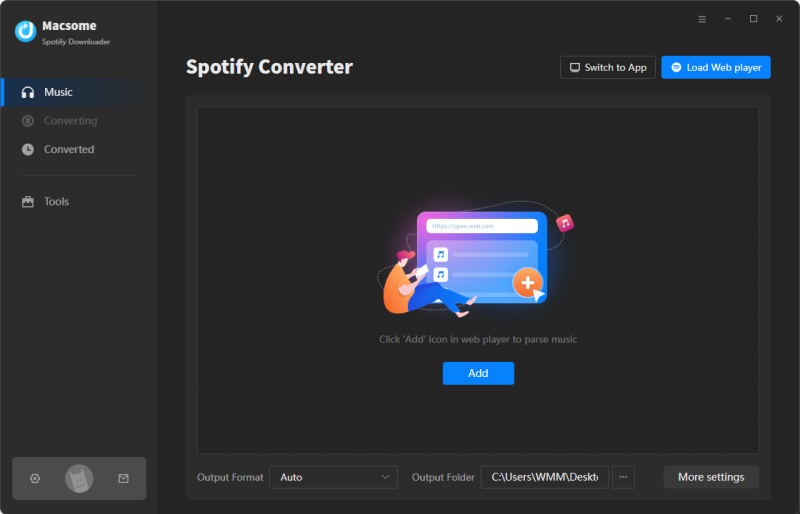
interface of Macsome Spotify Downloader


Step 2. Add Spotify Music to Macsome.
Navigate to the Queen of Tears OST in the Spotify web player, choose the Queen of Tears OST album. Then click the "Click to add" button, and the tracks will be loaded into the add window.

Step 3. Customize the Output Settings.
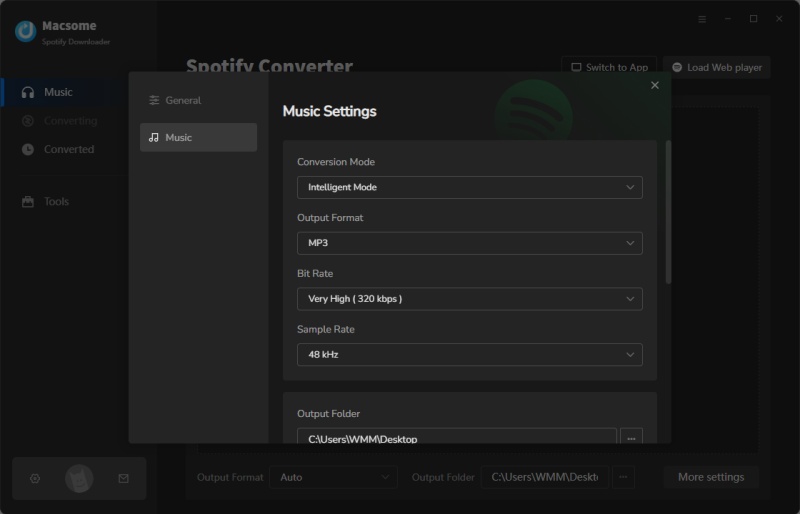
Click the Settings option in the lower-left corner, you can select MP3 as the output format from the drop-down list. You can also change the output folder, output file name, and output organization to meet your needs.

set MP3 or WAV as output format

Step 4. Start to Download Spotify Music to MP3.
Finally, simply click the "Convert" button to start downloading Queen of Tears Soundtracks from Spotify.

After the conversion, tap the "Converted" tab to find the downloaded Queen of Tears Soundtracks. And you can locate them on your computer by clicking the "folder" icon after each track.

Monday, April 22, 2024

How to Download Music from Deezer for Offline Listening

To download music from Deezer for offline listening, you will need to have a Deezer Premium subscription. With a Premium account, you can download music to your device and listen to it without an internet connection. 

By the way, we can also introduce a Deezer Music Converter that lets you download songs from Deezer for listen to offline. You can still keep playing the downloaded Deezer songs after your subscription expired. 


Download Deezer Music with Macsome Deezer Music Converter

Macsome Deezer Music Converter is a professional Deezer Music downloader, which is specially designed to download Deezer songs, albums, playlists, and podcasts in your local folder. Besides, it can also convert Deezer songs to common audio formats, including MP3, FLAC, WAV, AAC, AIFF, and ALAC with up to HiFi output quality. Therefore, you can keep the converted Deezer Music songs as long as you want.

Here's a step-by-step guide on how to download music from Deezer by using Macsome Deezer Music Converter for offline listening. 

Step 1. Log on to the Deezer Music Web Player

Macsome has a built-in Deezer Music Web Player that requires no additional installation. Simply log on to the Web Player by clicking the "LOG IN" button.

Step 2. Set the Output Formats and Other Parameters

Click on the "Settings" on the toolbar, Macsome helps to convert Deezer Music to MP3, AAC, WAV, FLAC, AIFF and ALAC output formats. It also offers audio quality settings (128kbps, 192kbps, 256kbps, 320kbps), you can adjust the bit rate to get better audio quality. There you can also customize the output folder, output organized by Album or Artist as you like.


Step 3. Add Music and Playlists from Deezer Music

Choose an album, a song or playlist as you like, click the blue "Click to add" button to select the songs you want to convert.

Step 4. Start to Download Deezer Music

Finally, press the "Convert" button to start downloading Deezer music. Once the conversion is finished, please click "Converted", and you can find the downloaded Deezer Music songs in the destination folder you set. Now, you can transfer Deezer music to any media device to play them without limits. 

To download Deezer music offline listening, you will need to have a Deezer Premium subscription. Use the search function within the Deezer app to find the music you want to download for offline listening. It's important to note that downloaded music from Deezer is only accessible within the Deezer app and cannot be transferred to other devices or media players. When your subscription expired, all your downloads are not available anymore. 

Thanks to Macsome Deezer Music Converter, you can save Deezer music in your local folder, so that you can enjoy them offline even without Deezer subscription later. 


In summary, with a Deezer Premium subscription, you can easily download music for offline listening using the Deezer app. This feature allows you to enjoy your favorite tracks and albums even when you don't have an internet connection. With the help of Macsome Deezer Music Converter, you have the ability to download and convert Deezer Music songs as MP3, FLAC or other formats, so that you can keep Deezer Music songs for offline listening even if you unsubscribe from Deezer Music.

Tuesday, April 16, 2024

How to Download Playlists from Amazon Prime Music on Computer?

Downloading Amazon Prime Music is a convenient way to enjoy your favorite music offline. But Amazon Music Prime and Amazon Music Unlimited titles are not available for download to computers.

Don't worry, here's how to download playlists from Amazon Prime Music on your computer.

Best Tool to Download Amazon Prime Music on Computer

Macsome Amazon Music Downloader is an excellent tool for downloading Amazon Prime Music on a computer. This powerful software is designed to help users download and convert Amazon Prime Music to various formats, including MP3, AAC, WAV, FLAC, AIFF, and ALAC. 

With Macsome Amazon Music Downloader, users can download music in high quality and enjoy it on any device without restrictions.

It is a practical Amazon Prime Music Downloader. With it, you can download songs from Amazon Prime Music and save them as MP3, AAC, WAV, AIFF, FLAC, and ALAC without quality loss. Furthermore, there is no need to install the extra Amazon Music app, Prime subscribers are able to download a full music catalog with 100 million songs on Amazon Music.

Notably, Macsome allows you to sort out the downloaded Amazon Prime tracks, albums, and playlists by Artist, Album, Playlist Name, Artist/Album, Album/Artist or simply save all the songs under the same folder. Thus, you can pick and play any artist, album, or playlist on-demand with no skipping.


Step-bystep to Download Amazon Music to Computer with Macsome Amazon Music Downloader

To use Macsome Amazon Music Downloader, simply follow these steps:

1. Download, install, and launch Macsome Amazon Music Downloader on your computer.

2. If you use the Amazon Music app mode, the app will start at the same time. Or you can choose the Amazon Music web player mode, and log in to your Amazon Music account. 

3. Browse and select the Amazon Music tracks, albums, or playlists that you want to download.


4. Choose the output format and other settings according to your preferences.

5. Click the "Convert" button to start the downloading and conversion process.

Once the process is complete, you can transfer the downloaded Amazon Prime Music files to any device for offline playback. 

Macsome Amazon Music Downloader is a convenient and efficient solution for anyone who wants to enjoy their favorite Amazon Music tracks without any restrictions.

Thanks to Macsome Amazon Music Downloader, downloading playlists from Amazon Prime Music on your computer is a simple and effective way to enjoy music on your own terms.

Sunday, March 24, 2024

Macsome Launches Up to 40% Discount Easter Special Sale

Macsome Inc, a leading provider of cutting-edge multimedia software, is pleased to announce its much-anticipated Easter & Spring promotion, which kicks off on 23 March 2024. In the spirit of the Easter season, Macsome is offering customers an exceptional opportunity to experience its premium products at incredible discounts, with savings of up to $40.

May your basket be filled with Easter eggs and your life filled with joy during this holiday season. Happy Easter!


 Macsome is delighted to announce its long-awaited Easter promotion, which runs from now until 30 April 2024. This event is open to all users who can save up to $40 off the lifetime version of its multimedia converters and up to $15 off the annual subscription of all products.

To enjoy this time-limited Macsome Easter promotion, you can visit the official order page to get more information. https://www.macsome.com/order.html

Hot Sales of Macsome Products:

Yearly Subscription Deals (Up to $15 OFF):

*Spotify Music Downloader: $44.95 (Original: $59.95)

*Apple Music Converter: $44.95 (Original: $59.95)

*YouTube Music Downloader: $44.95 (Original: $59.95)

*Amazon Music Downloader: $44.95 (Original: $59.95)

*Tidal Music Downloader: $44.95 (Original: $59.95)

*Deezer Music Converter: $44.95 (Original: $59.95)

*Pandora Music Downloader: $44.95 (Original: $59.95)

*Audible Audiobook Converter: $44.95 (Original: $59.95)

ALL Lifetime License Save Up to $40 Off

*Spotify Music Downloader: $89.90 (Original: $129.90)

*Apple Music Converter: $89.90 (Original: $129.90)

*YouTube Music Downloader: $89.90 (Original: $129.90)

*Amazon Music Downloader: $89.90 (Original: $129.90)

*Tidal Music Downloader: $89.90 (Original: $129.90)

*Deezer Music Converter: $89.90 (Original: $129.90)

*Pandora Music Downloader: $89.90 (Original: $129.90)

*Audible Audiobook Converter: $89.90 (Original: $129.90)

Hot Products Introduction

Macsome Spotify Downloader: As a powerful Spotify Music Converter, it allows both Spotify Premium and Free users to download songs, playlists, and albums from the Spotify app to the local computer. It can convert Spotify music to MP3, AAC, WAV, FLAC, AIFF, and ALAC with 100% original quality. It also keeps ID3 tags after conversion. Besides, users can use it to convert their local music to MP3/M4A/AAC/WAV/ OGG/AIFF and edit ID3 tags.

Macsome YouTube Music Downloader:
Available for both YouTube Free and Premium users to download YouTube Music to MP3, AAC, WAV, FLAC, AIFF, and ALAC. If the YouTube Music includes music videos, Macsome YouTube Music Downloader has ability to download YouTube Music Videos to MP4 with up to 4K quality. Thus, you can watch YouTube Music Videos and listen to YouTube Music without ads interruption.

Macsome iTunes Music Converter: It is a combination of Apple Music Converter, iTunes music downloader, and audiobook recorder. With it, users are capable of converting any audio that can be played in iTunes, including Apple Music files, audiobooks, iTunes music, or other downloaded music, to MP3, AAC, FLAC, AIFF, WAV, or ALAC format with high-quality.

Macsome Deezer Music Converter:
This professional Deezer Music Converter works on both Mac and Windows platforms, and aims to help Deezer subscribers to convert Deezer Music, podcasts, albums, and playlists to plain MP3, AAC, WAV, FLAC, AIFF, and ALAC with HiFi sound quality.

Macsome Tidal Music Downloader: It is an all-in-one Tidal Music Converter. With it, you can download Tidal tracks, playlists, albums, and podcasts on your computer. Besides, you can also save any Tidal audio files to MP3, AAC, WAV, FLAC, AIFF, and ALAC formats. Therefore, you can enjoy Tidal music on any device you have.

Macsome Amazon Music Downloader: Macsome Amazon Music Downloader allows Amazon Music users to download songs, playlists, albums, and podcasts from Amazon Music Unlimited & Prime Music. Moreover, it also supports converting Amazon Music to AIFF, MP3, AAC, FLAC, ALAC, and WAV with high output quality.

Macsome Pandora Music Downloader:
ownload Pandora music songs, playlists, and podcasts to MP3, AAC, WAV, FLAC, AIFF, and ALAC with a Pandora Free account.

Macsome Audible Audiobook Converter: Convert Audible Plus Catalog to MP3, M4A, or M4B with up to 300x faster speed. It can also convert local Audible AA or AAX audiobooks to MP3, M4A, and M4B formats with ID3 tags preserved.

Pricing and Availability

Macsome provides 30%~40% discounts for all its single product. Customers can also get different plans for these programs, including yearly plans and lifetime plans. All the tools will help users enjoy their digital life easier. The Macsome 2024 Easter promotion event will expire on Apr. 30, 2024.

About Macsome Inc

Macsome Inc is a software development company that was established in 2008. It is devoted to providing ultimate multimedia solutions to customers worldwide. Main products include Spotify Downloader, Apple Music Converter, YouTube Music Downloader, Amazon Music Downloader, Tidal Music Downloader, Deezer Music Converter, Pandora Music Downloader, and the new upgrade of Audible Audiobook Converter.

Press Contact

Name: Leo Fan

Email: market@macsome.com

Website: https://www.macsome.com

Facebook: https://www.facebook.com/MacsomeOfficial

Promotion page: https://www.macsome.com/order.html

Thursday, March 14, 2024

Macsome iTunes Converter Introduced New AI Audio Splitter

Macsome, a professional software development company, is delighted to announce the launch a new AI Audio Splitter of Macsome iTunes Converter , a free AI audio processing tool, which enables you to isolate vocals from music, background instrumental sound, and noise.


This new AI Audio Splitter allows to separate music into an individual streams such as vocal, bass, percussion, and lets you balance their individual volumes. This is the simplest way to get multi-tracks from any song. Once you choose a song, artificial intelligence will separate music into stems: vocals, bass, drums, others.

How to Use AI Audio Splitter of Macsome iTunes Converter

1.Download, install, and launch Macsome iTunes Converter on your Windows or Mac.

2.If you’d like to isolate instruments and vocals from Apple Music songs, you can select Apple Music from the Apple Music app or web player. And then add the select songs from Apple Music to Macsome. Then start to download Apple Music process. After downloading, you’ll locate the downloaded Apple Music songs in your local folder.


3.From the Tools tab, you can find the AI Audio Splitter. If you use this tool first time, the program will check you whether install some necessary AI models. If not, it will take a few minute to install the component. Please make sure you have enough space on your disc.


4.When everything is ready, you can drag local files or click "+ Add" to add the downloaded Apple Music songs, then select the format, sound quality, and output path. When you have configured the output preferences, click the "AI Split" button to start the splitting process. The duration will depend on the length of the audio and your computer's processing speed.


Please note

1. All components of the AI models take up approximately 3.2G of space on your device. Please make sure you have enough space on your disc and wait patiently for a few minutes.

2. For the best separation of vocals from backing tracks, it's best to use a higher quality file. We recommend using lossless audio such as FLAC, WAV and ALAC for best results.

3. The final result will depend on a number of factors such as music platform, song genre, sound quality, output settings, device, network, etc.

What Macsome iTunes Converter Do for You


Macsome iTunes Converter is an all-in-one Apple Music Converter, which lets you download Apple Music songs, iTunes M4P music, and podcasts on your computer with original output quality so that you can enjoy Apple Music without any limitations. It can also convert Apple Music to MP3, AAC, FLAC, WAV, AIFF, and ALAC, thus, you can enjoy Apple Music on non-apple devices. Besides, it also lets you fast download Apple Music with lyrics preserved from the web player.

Apart from AI Audio Splitter, Macsome iTunes Converter also offers other free tools, including Audio Editor, Format Converter, Tag Editor, CD Burner (only available for Windows version). It also provides AA/AAX Converter for registered users, which lets you convert local Audible audio books to MP3, M4A, and M4B with original quality.

Pricing and Availability

Macsome iTunes Converter offers a free trial version, which allows you to download 1 minute of each track. It is fully compatible with both Windows and Mac platforms. You can use the AI Audio Spltter for free.

About Macsome Inc

Macsome Inc is a software development company that was established in 2008. It is devoted to providing ultimate multimedia solutions to customers worldwide. Main products include Spotify Downloader, Apple Music Converter, YouTube Music Downloader, Amazon Music Downloader, Tidal Music Downloader, Deezer Music Converter, Pandora Music Downloader, and the new upgrade of Audible Audiobook Converter.

Press Contact

Name: Leo Fan

Email: market@macsome.com

Website: https://www.macsome.com

Facebook: https://www.facebook.com/MacsomeOfficial

Macsome page: https://www.macsome.com/itunes-music-converter-win/

Wednesday, March 13, 2024

Receiptify Last.fm: How to Create Last.fm Receipts with Receiptify Last.fm

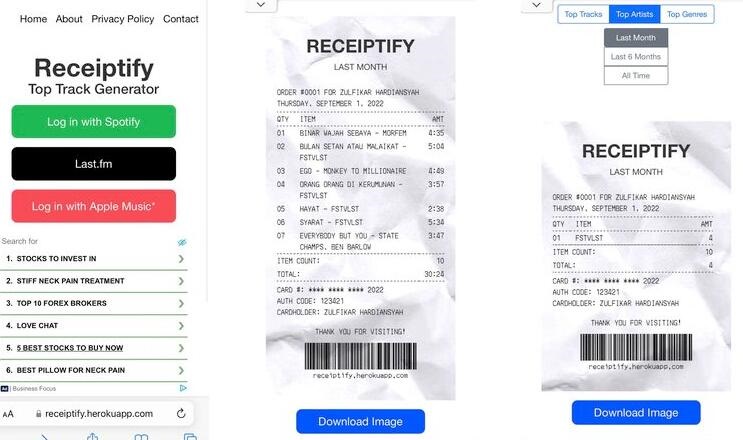
Receiptify is a service that allows music streaming users to generate digital receipts for their music listening history.  This platform supports Spotify, Apple Music, and Last.fm services. 

Last.fm is a popular online service that offers both free and paid versions. Last.fm offers information on music artists and albums and if you create a user profile Last.fm allows you to track the music you listen to in Banshee for free.


Receiptify Last.fm takes this data and creates detailed receipts that users can use for personal record-keeping, sharing with friends, or even for business purposes. These receipts can include information such as the date and time of each song played, the artist and track name, and the duration of each listening session.

Receiptify Last.fm is a valuable tool for music enthusiasts who want to keep track of their listening habits over time.

How to Create Last.fm Receipts with Receiptify Last.fm

To create Last.fm receipts with Receiptify Last.fm, follow these simple steps:

1. Sign Up for Receiptify Last.fm

Visit the Receiptify Last.fm website and sign up for an account. Provide the necessary information to create your account.

2. Connect Your Last.fm Account

Once you have created an account, you will need to connect your Last.fm account to Receiptify Last.fm. Follow the on-screen instructions to authorize Receiptify Last.fm to access your Last.fm data.

3. Generate Receipts

After connecting your Last.fm account, you can start generating receipts for your music listening history. Select the time period for which you want to generate the receipt, such as a week, month, or custom range.

4. Customize Receipt Settings

Receiptify Last.fm allows you to customize the appearance and content of your receipts. Choose the layout, color scheme, and additional details to include in your receipts.

5. Download or Share Receipts

Once you have customized your receipt, you can download it as a PDF or share it directly from Receiptify Last.fm. Share your music listening history with friends, family, or on social media.

By following these steps, you can easily create Last.fm receipts with Receiptify Last.fm. Whether you want to track your own music listening habits or share your favorite tunes with others, Receiptify Last.fm provides a convenient and customizable solution for generating receipts based on your Last.fm data.

Other Tips you Also Like:

Creating your own Spotify receipt using Receiptify is a simple and user-friendly process, follow these simple steps:

Step 1. Search for the Receiptify website on a search engine or enter the URL directly into the address bar. An app is also available for installation, but for security purposes, we recommend using the website.

Step 2. Click the "Log in with Spotify" button to be redirected to Spotify's login page. You can then sign in using your Spotify credentials or a linked account.

Step 3. Upon logging in, you must grant Receiptify permission to access and analyze your Spotify usage data. You can generate receipts for your top 10 or 50 tracks, artists, genres, and searched albums.

Step 4. Choose your preferred time range for the receipt, selecting between options like "Last Month", "Last 6 Months," or "All Time." Receiptify will then process your Spotify data, this may take a few minutes as it analyzes your listening history and preferences.

Step 5. After the data processing is finished, you will be able to view your personalized Spotify receipt. The receipt will show your top tracks based on your listening patterns, and you can download it. When you're ready to download, navigate to the bottom of the page and find the "Share" button. Click on it, and from the options that appear, select the "Download" icon.

Get Receiptify Spotify

Once downloaded, you can share the image on social media platforms such as Twitter, Instagram and Facebook, just like any other image.