Thursday, December 3, 2015

Special Sales for iTunes Gift Cards

123
It never hurts to get a nifty discount.
That and it’s nice to build a nice cache of iTunes gift cards to use all year round, especially if they’re available at a discount. Discounted iTunes gift cards are one of the only ways to save on apps, music, movies and even your Apple Music subscription.
A couple vendors are selling discounted iTunes gift cards this holiday season. Currently, the best deal of the bunch is a $100 iTunes gift card for $80 via PayPal Digital Gifts on eBay. The gift cards arrive via email within a few hours of purchase, but the limited time offer is only available in the United States.

The best deal (for U.S. readers) appears to be from PayPal Digital Gifts on eBay, which is offering a $100 iTunes gift card for $80 (or 20% off) with no apparent limit (Jason bought four of these bad boys). The auction listing notes that “limited quantities” are available and the discounted cards sold out in a few days last year.
Staples is offering a 20 percent discount on $25, $50, and $100 iTunes gift cards. (limit 3, expires December 5, 2015)
Best Buy is offering a “buy one, get a second at 20% off deal” on iTunes gift cards (for an effective discount of only 10%). You must add two eligible cards to your shopping cart for the discount to appear.
We’ve received reports about $100 of iTunes gift cards for only $75 from Rakuten.com (via SlickDeals.com), which sounds like a better deal until you realize that:
1. You must pay with Visa.
2. There’s a limit of one $100 card per customer.
3. They charge sales tax (at least in California).
Using Rakuten, the total for a $100 iTunes gift card comes to $83.75 (after tax), which is more than the eBay/PayPal deal above.
What have you seen? If you find any great deals on iTunes gift cards, please share them with us via comments and social media and we’ll update this post.
Reblog from http://www.powerpage.org/the-best-deals-on-itunes-gift-cards/.
After you purchased the gift card, if you want to buy some music songs, the iTunes Music Converter can help you make full use of the Music. 
If you have some protected Movies to convert, M4V Converter Plus is a good helper. 

Tuesday, December 1, 2015

Good News for iTunes Converter Fans

Vitals_Music
Macsome Inc recently released a new iTunes Converter Version for Windows users – Macsome iTunes Converter for Win V1.3.0 on November 26, 2015. In other words, Windows users can also use the iTunes Converter to convert your iTunes audios, like iTunes Match Music, iTunes Music, Apple Music, Audiobook, purchased Audiobook to MP3 / AAX with CD output quality and excellent conversion speed.
What iTunes Converter for Win can do for you?
1. Convert any iTunes audio files
Any Audios on iTunes you can play them successfully, you can use the iTunes Converter to convert them. Even the purchased music files and purchased Audiobooks you can also use the iTunes Converter to remove the protections.
2. Convert iTunes Match Music to MP3
When you subscribe to or turn on iTunes Match, your device or computer will be associated with your Apple ID. Your Apple ID can have up to 10 devices and computers associated with it.
When you convert the iTunes Match Music to MP3, there is no devices account limitations any more. Please make sure that your iTunes Match Music need to be downloaded from the iCloud.
3. Convert any downloaded Apple Music to MP3
When you subscribe Apple Music, you enjoy your entire music library from all of your devices. But when you cancel the subscription, even you have downloaded the Apple Music files, you can’t play them any longer.
Don’t Worry, iTunes Converter for Win help you solve the problem to convert any downloaded Apple Music to unprotected MP3 / AAC or other audio format. And then you can play the converted Music without limitation as you like.
4. Convert unprotected and protected Audiobooks on iTunes
When you use iTunes to play the Audiobooks normally, you can also use iTunes Converter to convert the AA / AAX to MP3 / AAC audiobooks with fast conversion speed.
5. Split the big audio files
iTunes Converter for Win is also an audio splitter for Win. With it, you can split the converted Music files or Audiobooks to small clips by setting the time duration as you need. The Split function can only work on converted Audios.

Tuesday, November 24, 2015

The Great and Wonderful songs for Thanksgiving Day 2015

Thanksgiving Day is coming, and the music song is as important as the Thanksgiving Day food and gifts. Here i collect some wonderful music songs for Thanksgiving Day, and you may like it.
Oliver! - Food, Glorious Food
"Oliver!" based on the Charles Dickens novel of the same name. Nothing makes you more grateful for your impending feast than a bunch of starved orphans who get nothing more than gruel for each meal.


Bing Crosby - Count Your Blessings
This classic by crooner Bing Crosby is a sweetly sung song that almost sounds like a Christmas carol that my grandparents would listen too. It was written by the wonderful Irving Berlin for the 1954 holiday film "White Christmas." It’s a winner for the whole family that will stick in your heart from the first time you hear it.
Johnny Cash - Thanksgiving Prayer
This is a thanksgiving song by none other than The Man in Black, Johnny Cash. Amazing right? As a special present to our readers, I made sure to include the link where he sings this holiday treat on the TV show "Dr. Quinn Medicine Woman." You’re welcome.


Thanksgiving Song - Mary Chapin Carpenter
Mary Chapin Carpenter wrote and performed this beautiful country classic. It comes off of her "Come Darkness, Come Light: Twelve Songs of Christmas" album but lends itself to Thanksgiving more than Christmas, truth be told. So if there are country fans in your household this may just be the next Thanksgiving classic tune in your home.


My Favorite Things - Julie Andrews
This song from "The Sound of Music" by the famous Rodgers and Hammerstein is familiar to most. I grew up singing this with my family during the holidays substituting some of our own favorite things into the song. It is simply a song about gratitude for what we love most and fits perfectly with the Thanksgiving season.


Over the River and Through the Woods
“Over the River and Through the Wood” is a Thanksgiving song by Lydia Maria Child . According to Wikipedia this song was written in 1844, originally as a poem with the title, "A Boy's Thanksgiving Day." There have been many versions of the song over the years that add Christmas lyrics in but the original was just about Thanksgiving. I’ve added a link to my favorite version by Danny Kaye and the Andrew Sisters. It has a lot more of the extra Christmas stuff added in but it’s Danny Kaye!


We Gather Together - Celtic Spirits
This is one of my favorite hymns of all time. Most of us grew up singing this in church every Thanksgiving but it is a Dutch hymn that made it to American congregations in 1903. This song is forever altered for me since I first heard the Mystery Science Theater 3000 version of it called "We Gather Together to Watch Cheesy Movies." I’ve linked to a beautiful Celtic rendition of the beloved hymn.


What a wonderful world - LOUIS ARMSTRONG.
It is a very simple song, that you can hear like a man talking his story to you. His voice is very attractive, and all of us need to believe in that "It is a wonderful world, and we can build a better world tomorrow"


Reblog from http://www.heraldextra.com/entertainment/the-top-thanksgiving-songs-that-actually-exist-i-swear/article_9a2afa92-4baf-11e3-9f6a-001a4bcf887a.html, 
Happy Thanksgiving Day 2015.
Ad time:  Want to convert Apple Music M4P to MP3Macsome iTunes Converter is your best choice.


Thursday, November 19, 2015

How to transfer Apple Music from M4P to MP3

Even when you subscribe the Apple Music service, you can enjoy all the Apple Music files online or offline. But you know that all Apple Music files are protected M4P format with Apples Fairplay DRM, in other words, you can only use Apple Music to enjoy the music files instead of other MP3 player and like this.
If you want to play Apple Music songs on MP3 player, you need to convert Apple Music from M4P to MP3 and then transfer them to your MP3 player easily and enjoy them freely.
Here recommend you an all-in-one yet simple Apple Music Converter – Macsome iTunes Converter, which is used to convert any protected iTunes music files to MP3 / AAC and so on. If you can play these iTunes music files, you can use the iTunes Converter to convert them.
Quick guide to convert Apple Music files from M4P to MP3.
Step 1: Free download and install Macsome iTunes Converter and run it.
Tips: Download iTunesConverter.dmg by clicking http://www.macsome.com/iTunesConverter.dmg.
Step 2. Load Apple Music files to convert.
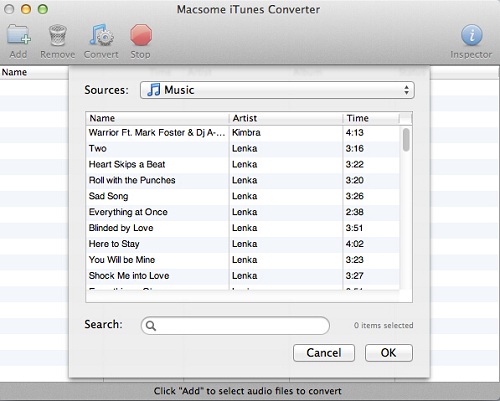
Click Add button and choose the Music library and add the files you want to convert.
add-music
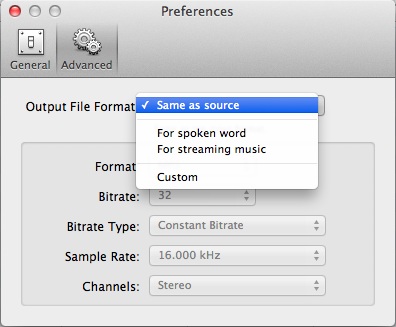
Step 3. Click Macsome iTunes Converter Menu, and in the drop-down list, choose Preferences, turn to Advanced to set the output format.
output
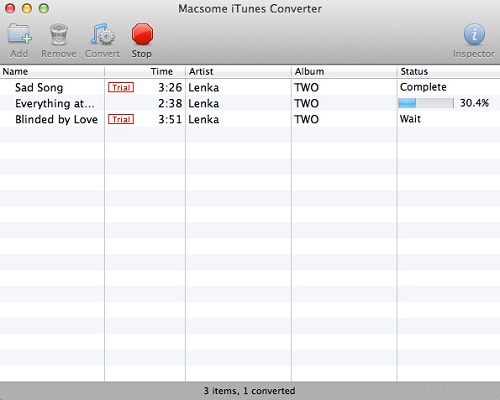
Step 4: Click Convert button to start removing DRM from Apple Music.
converting
 After the conversion process is finished, you can play the converted Apple Music MP3 files anywhere and anytime as you like.

M4P VS MP3
M4P stands for MPEG 4 Protected (audio). The M4P file extension is seen in an Apple iTunes purchased song which uses Apples “Fairplay” DRM (digital rights management). Unprotected AAC  files have an M4A extension.
M4P files can usually only be opened with iTunes and the computer must be authorized prior to playing transferring from an iPod or burning the file. An iTunes account can be authorized on five computers and an iPod may contain the content from a maximum of five accounts.
AAC or M4P file quality is better and file sizes smaller compared to MP3 files.
MP3 (MPEG-1 Audio Layer-3) is a standard technology and format for compressing a sound sequence into a very small file (about one-twelfth the size of the original file) while preserving the original level of sound quality when it is played.
MP3 provides near CD quality audio. It is one of the most common music file types. It is not an MPEG 3 but uses the audio compression found in layer III in MPEG 1 or 2 video files, the audio stream layer.

Tuesday, November 17, 2015

How to delete the terrible DRM of Apple Music

Since Apple Music came up, users always complain for the sucks DRM and so on. When you input “Apple Music” via Google, the first page you can find one title that “Apple Music and the terrible return of DRM” .
All of us know that iTunes removed all the DRM limitations of music files in 2009, and now it came again on Apple Music. In the terrible DRM article, the author said that
There's not even a single standard playlist format to make switching services easier, like the old .m3u playlist files my friends and I used to swap back and forth between iTunes and WinAmp and whatever else. There's just lock-in, endless lock-in.
For the terrible DRM, users can’t make full use of Apple Music, don’t worry, here I will show you how to delete the terrible DRM easily and quickly.
Streaming-Service Apple Music
Only one program, your Mac, Apple Music subscription, you can easily remove the DRM from Apple Music.
The program name is Macsome iTunes Converter (http://www.macsome.com/itunes-converter-mac/index.html). It is always used to convert any Apple Music to MP3 / AAC, and remove DRM from protected Apple Music. If you have some other iTunes audios , you can also use the iTunes Converter to convert it to the format you like.
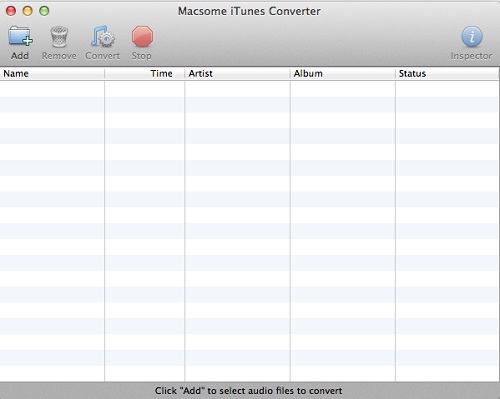
First go to free download the latest version of Macsome iTunes Converter, install and run it, you can see the following friendly user interface.
interface
Second, click Add button and choose the Music library and add the files you want to convert.
add-music
Third, click Macsome iTunesConverter Menu, and in the drop-down list, choose Preferences, turn to Advanced to set the output format.
output
Forth, click Convert button to delete the DRM from Apple Music.
converting

While you finish the conversion, you have deleted the DRM from Apple Music as well, and now you can enjoy and play the Apple Music wherever as you like.
After conversion, all the DRM limitations of Apple Music files can be removed. And you can enjoy the converted Apple Music files without any limitations any more.
Want to know more about the Apple Music Converter, view http://www.macsome.com/itunes-converter-mac/apple-music-converter.html


Thursday, November 12, 2015

How to delete the unwanted MP3 segments and crop your MP3 for free

audio-cutter
If there are some one music clip you like and want to add to decorate your videos or use as your ringtone, how to edit / cut the music songs? Now the article will tell you how step by step.
audio-editor-smallTo cut the unwanted music clip, you need a free music editor to help you, like Macsome Audio Editor
You can use the free Audio Editor to easily edit, cut and trim mp3 / AAC without the quality loss caused by other editors on Mac. And you can save to a file easily, or adjust volume. Add fade in or fade out effects.

Step 1. Download, install and run Macsome Audio Editor.
The audio editor is freeware. There is no additional cost to get the full version of Macsome Audio Editor.
After you download the installation file, install it and launch the audio editor.
Step 2. Click Open to add the music you want to edit.
Step 3. Click Play button, and now press Start button to start selecting automatically. If you want to end selecting, press the End button.
Step 4. After you select the part of the music, click Crop to leave only the selected music part, and then if there is still some segment you want to remove, select and then click Del button.
After you crop the audio, the selected fragment will be added to the program as a new file, and you can free to edit. And now you can use the cropped audios as you like, like setting it as your ringtone, add into some video clips and so on.
In addition to the above mentioned, Macsome Audio Editor also supports ID Tags adding and editing, Setting audio and saving. You can take a try.
More functions and guides, you can view: http://www.macsome.com/audio-editor-mac/online-tutorial.html


Tuesday, November 10, 2015

How to free split MP3 Audiobooks to several clips on Mac

4Sometimes you may have some audiobooks are MP3 formats, but the whole file is so long up to 4-5h per file. However MP3 audiobooks don’t keep the chapter info.
If you want to find the exact place which you listen to the last time, it is very difficult. Have you ever thought of splitting the big MP3 books to some small clips, so you can listen to them one by one.
3
First of all, if we want to split MP3 audios, we need a free audio splitter to help us, here we use Macsome Audio Splitter (http://www.macsome.com/audio-splitter-mac/index.html) to split big audio files in unprotected MP3 or AAC file format to multiple smaller pieces in a few seconds. on Mac.  
audio-splitterStep 1. Click the download link url to free download the free MP3 splitter, install and run it.

Step 2. Click the Add button, select the files to add in the new window and then click the Open button to add.
Step 3: Click Split button to customize the splitting settings.
Audio Splitter provides users 3 methods to split the audio files.
Method 1: The default option is splitting by the duration with the input seconds value.
Method 2: Split by the numbers of segments, the default value is 1.
Method 3: Split according to the starting and ending time by the input second value or click "+" button to increase the number of interception and click "-" button to delete the excess ones.

Step 4. Click the Output drop-down list and select Custom to customize the output path. You can also use the default path ~/ Documents/ Audio Splitter.

Step 5: Now click OK button to start the unbelievably fast splitting. Audio Splitter can split the files to multiple smaller pieces in a few seconds.

Now you can fast find the original or generated audio by right-click Show in Finder. And now you can enjoy the split MP3 books as you like.
Macsome AudioSplitter could only split unprotected MP3 or AAC files. If you want to split audio book files you purchased, such as Audile AA files, you may need to try our Audiobook Converter